HighLevel Affiliate Manager: Manual Sale Attribution
HighLevel's Affiliate Manager now lets you manually attribute sales to affiliates, giving you more control over commission tracking.
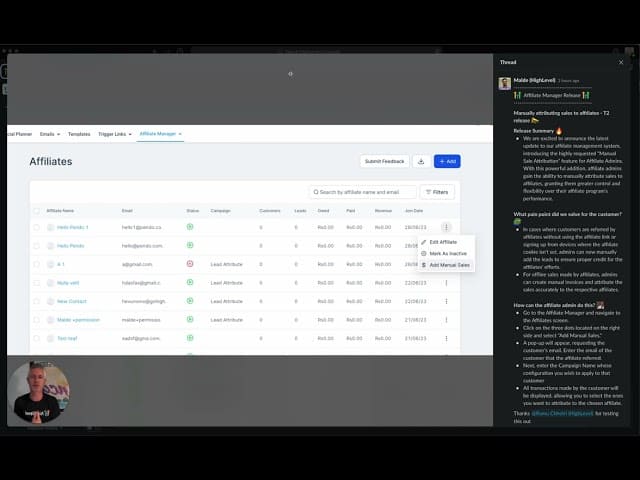
Click on the image above to watch the full video.
What Is Manual Sale Attribution?
Sometimes affiliate tracking doesn't work perfectly:
- Customer didn't click the affiliate link
- Sale happened offline (in-person, phone)
- Link was shared incorrectly
- Technical issues with tracking
Manual attribution lets you credit the affiliate anyway.
How It Works
Step 1: Access Affiliate Manager
Go to Marketing → Affiliate Manager
Step 2: Find the Customer
Search for the customer who made the purchase.
Step 3: View Transactions
See all transactions made by that customer.
Our Toolbox. Every platform, plugin, and service we use and recommend, in one place. See the list →
Step 4: Create Manual Attribution
Select the transaction and attribute it to the appropriate affiliate.
Use Cases
Med Spas and Service Businesses
Customer A refers Customer B who books in person. Manually credit Customer A's affiliate account.
Offline Sales
Trade show or event leads that convert later — attribute to the affiliate who generated the lead.
Link Issues
Affiliate link didn't track properly but you know who referred the customer.
Phone Sales
Customer called instead of clicking the link — still credit the affiliate.
Why This Matters for Referral Programs
- No risk to you — Only pay when a sale happens
- Fair to affiliates — They get credit even if tracking fails
- Better relationships — Affiliates trust your program
- More flexibility — Handle edge cases properly
See Also
- HighLevel — The platform
See Also
This article blends original content, AI-assisted drafting, and human oversight. How I write.
Stay Updated
Get notified when new content is published.
No spam. Unsubscribe anytime.