Your Website Can Fix Itself Now
I'm going to be honest. I barely know what Largest Contentful Paint means. I know it's one of those Google metrics that affects your search rankings, and I know a lower number is better. That's about it.
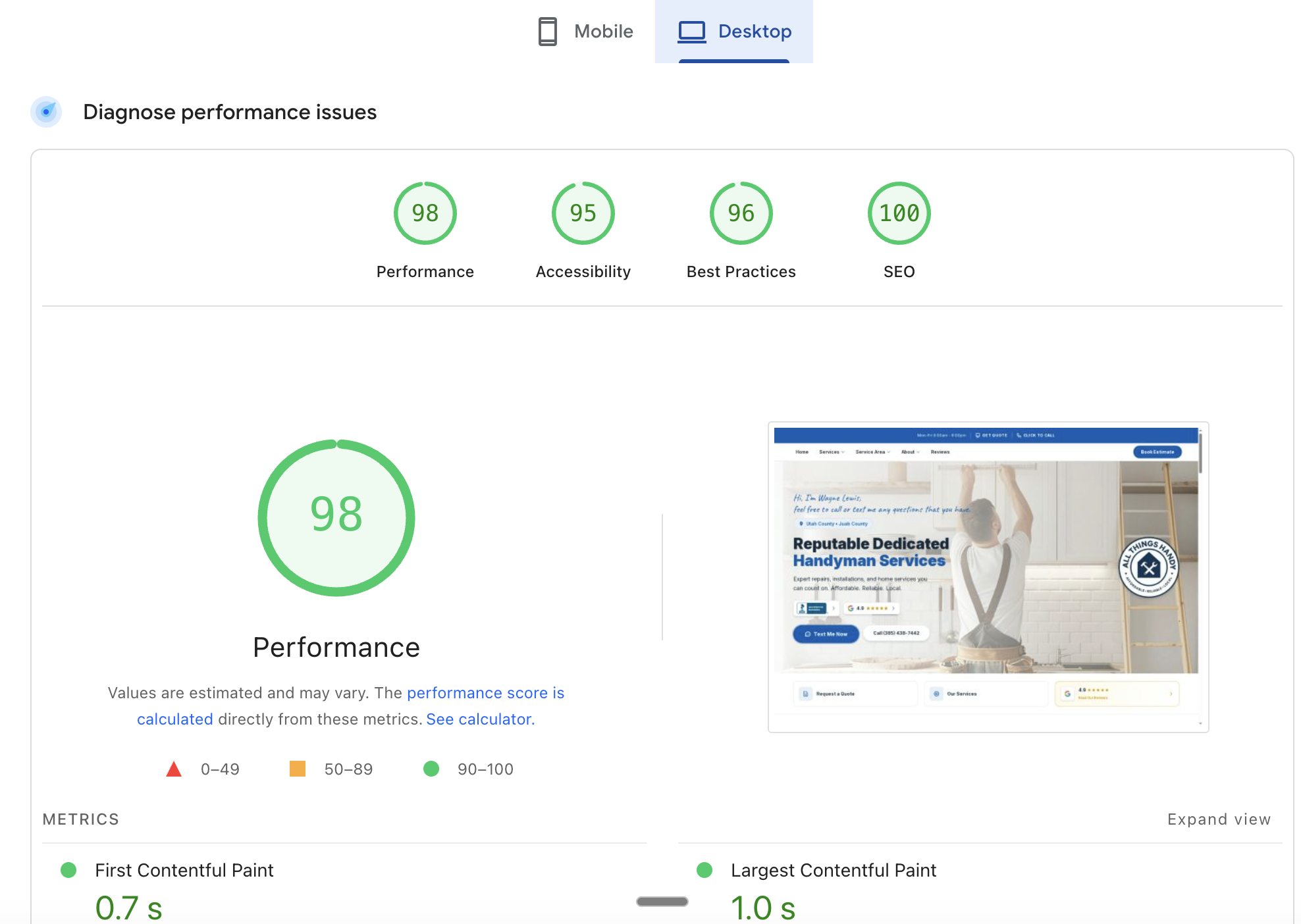
Tonight I improved it by 27% on a client website. I also converted six images to a more efficient format, added missing dimension attributes to prevent layout shift, and pushed two clean builds to production. The whole thing took about fifteen minutes and I never left the terminal.
That's not the interesting part.
The interesting part is that I didn't plan to do any of this tonight. I was in Claude Code working on something else entirely, and I just said "run a PageSpeed Insights audit on AllThingsHandyUtah.com." Claude built the script, ran the audit, showed me the results, identified the fixes, made the changes, committed the code, pushed to Cloudflare Pages, waited for the deploy, and re-tested. All in one conversation.
Here's what clicked for me tonight. I already had Claude Code managing my websites. The code, the git repos, the deployments. And I already had it connected to Google Search Console through a Python script I built in a previous session. So when I wanted to check PageSpeed Insights, it was trivial. Claude just wrote a new script in the same repo, ran it, and suddenly my website analytics and my website code were in the same conversation.
They could talk to each other.
The audit said "these six images are too large." Claude looked at the images, converted them to WebP, updated every reference across 24 files, rebuilt the site, pushed it, and re-tested. It's almost like the website can heal itself.
If you're used to the old way of doing things, where PageSpeed Insights is a website you visit, and your code is in a text editor, and your deployment is a separate dashboard, and your analytics is another tab, this probably sounds wild. But when all of those things live in the same place, the friction just disappears.
Want to try it? Start using Claude Code →
What Actually Happened
Here are the real numbers from tonight's session on a small business handyman website:
| Image | Before (JPG) | After (WebP) | Savings |
|---|---|---|---|
| Installation header | 212 KB | 47 KB | 78% |
| Rooms and storage header | 156 KB | 17 KB | 89% |
| Home maintenance header | 150 KB | 69 KB | 54% |
| Homepage header | 170 KB | 65 KB | 62% |
| Welcome photo | 43 KB | 31 KB | 27% |
| Mobile hero | 25 KB | 14 KB | 45% |
Total savings: 513 KB across six images. The desktop performance score went from 98 to 99, and the Largest Contentful Paint improved 27%, dropping from 1.1 seconds to 0.8 seconds.
But here's what I think matters more than the numbers. The PageSpeed audit also flagged images without explicit width and height attributes, which cause layout shift when the page loads. Claude found every instance across the codebase, added the correct dimensions, and fixed them. Not just the homepage. Every page that used those images.
Our Toolbox. Every platform, plugin, and service we use and recommend, in one place. See the list →
I also found two images that were missing from the first pass. Instead of starting over, I just said "you missed these" and Claude converted them and pushed a second build. The whole workflow felt like talking to a developer who already knows my codebase.
Compare This to WordPress
If I were running this same site on WordPress, here's what "fixing my PageSpeed score" would actually look like:
- Go to PageSpeed Insights in a browser, paste the URL, wait for results
- Read the recommendations, try to figure out which ones I can actually fix
- Install a plugin like ShortPixel or Imagify for image compression
- Configure the plugin, maybe pay for a plan
- Wait for it to process all the images
- Hope it doesn't break anything
- Install another plugin for lazy loading
- Install another plugin for caching
- Google "how to add width and height to WordPress images"
- Realize my theme doesn't support that easily
- Go back to PageSpeed Insights and re-test
- See that the score barely moved because the plugins are fighting with each other
- Give up and move on
That's not an exaggeration. That's the actual experience most WordPress site owners have with performance optimization. You end up with five plugins trying to solve one problem, and none of them can see the others.
With Claude Code, the AI can see the code, the images, the configuration, and the test results all at once. It doesn't need a plugin for image compression because it can just convert the files. It doesn't need a plugin for width and height attributes because it can read the image dimensions and edit the HTML directly. There's no plugin layer adding complexity between you and the fix.
The Ecosystem Effect
This is the thing I keep coming back to. Each tool I connect to Claude Code makes every other tool more valuable. I set up Google Search Console access a few weeks ago. Tonight I added PageSpeed Insights. Next time I run my GSC health audit, I can also check page speed in the same session. If the audit finds a slow page, Claude can look at the code, identify the bottleneck, fix it, deploy it, and verify the fix. One conversation.
It compounds. My website code is in Claude Code. My search analytics are in Claude Code. My CRM data is in Claude Code through MCP servers. My email is accessible through Claude Code. When a new lead comes in through the website, I can trace the entire journey from Google search query to form submission to CRM contact, all without switching tools.
That's not just convenience. It changes what's possible. Instead of checking PageSpeed Insights once a quarter and feeling guilty, I can make it part of my regular workflow. "Hey, check the speed on my sites while you're at it." Done.
Need help optimizing your site? Create a ticket today →
What I'd Do Next
If you want to try this yourself, here's the rough path:
- Get your website code into a git repository that Claude Code can access
- Build a simple PageSpeed Insights script (the API is free, no key required for basic use, 25,000 requests per day with a key)
- Run an audit and let Claude read the results
- Ask Claude to fix the easy wins: image format conversion, missing dimensions, render-blocking resources
- Push, deploy, re-test
The first time takes the longest because you're building the script. After that, it's a conversation. "Check allthingshandyutah.com." Done.
The setup is the tax you pay once. After that, it's practically free to run these audits whenever you want.
See Also
- claude-code-google-search-console -- How I connected Google Search Console to Claude Code and fixed canonical URL issues in one session
- claude-code-deterministic-pattern -- The architecture behind having Python scripts do the data work and Claude do the thinking
- Cloudflare -- The CDN and hosting platform that makes these deploys instant
We are an independent affiliate of Claude Code and may earn a commission if you sign up through links on this page. We are not employees or representatives of Claude Code.
Some links in this article are affiliate links. If you purchase through them, we may earn a commission at no extra cost to you. This helps support our content.
This article blends original content, AI-assisted drafting, and human oversight. How I write.
Stay Updated
Get notified when new content is published.
No spam. Unsubscribe anytime.