Pay Your Utah State Income Tax Online
Paying Taxes Online Should Be Easy. It's Not.
It's amazing that we can pay our taxes online now. But man, it's still a little overwhelming. This is something you really don't want to get wrong, and the whole time you're clicking through government forms, you're never quite sure if you're picking the right option.

So today I sat down to pay my Utah state income tax and decided to walk through it step by step with Claude Code. I told it what I was trying to do, showed it my screen, and it guided me through each dropdown and selection. The whole thing took about five minutes.
Here's the write-up so you don't have to figure it out alone.
Disclaimer: I'm not a CPA, I'm not an attorney, and I'm not saying this is the "right" way to do it. This is what I did, and it worked for me. If you're unsure about your tax situation, talk to a professional. I'm just a guy who paid his taxes online and wrote down the steps.
You Don't Need to Log In
This is the part that surprised me. I assumed I'd need to create an account or log in to the Utah Taxpayer Access Point (TAP) website. Turns out you don't need any of that for a standard payment.
Right on the TAP homepage, there's a Payments section in the middle of the page. Click Make a payment and you're off.
Step 1: Choose Standard Payment
You'll see three options: Standard Payment, Coupon Payment, and Multi-Source Payment.
Pick Standard Payment. This is the most common method. They accept bank account (ACH), credit card, or debit card.
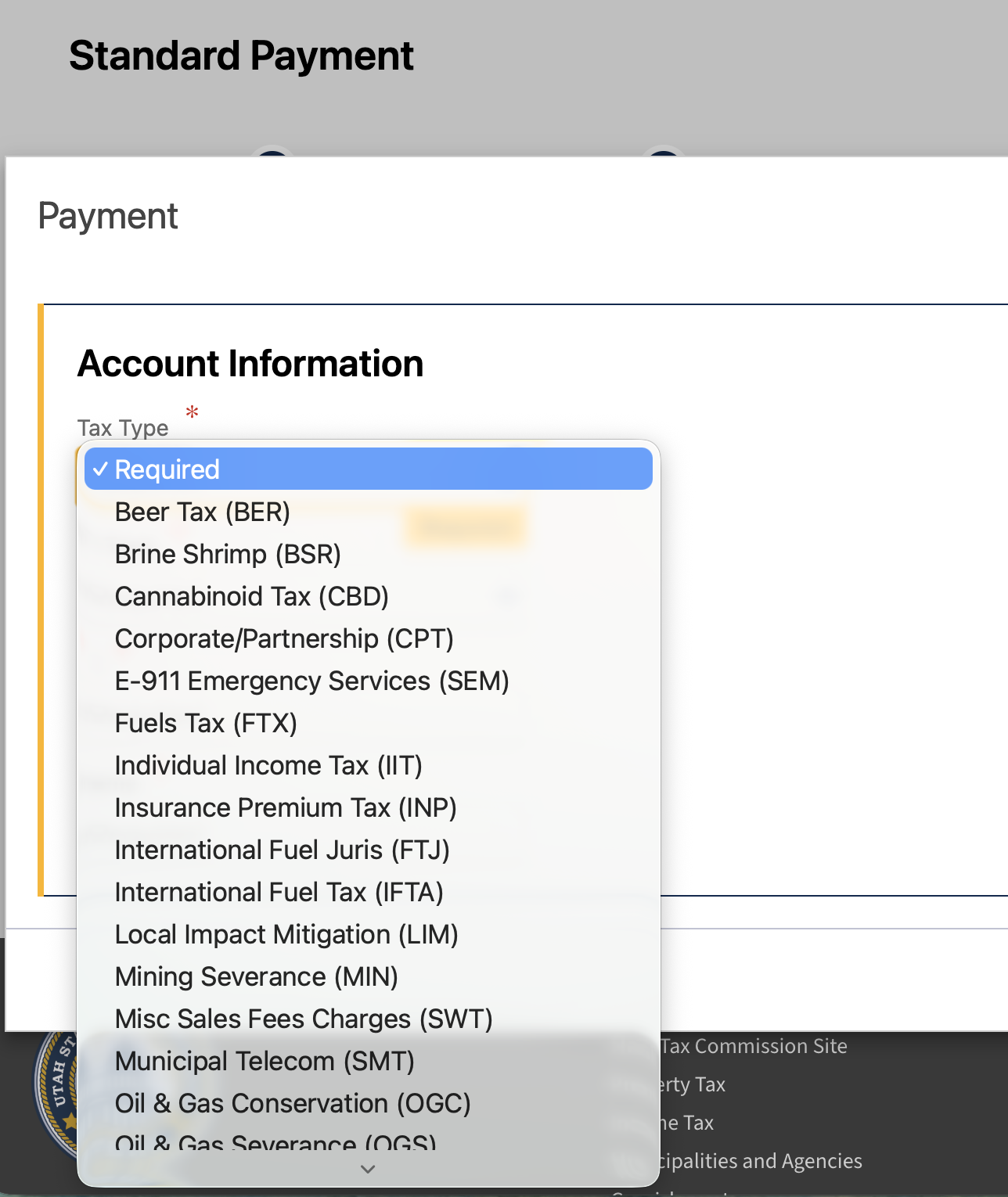
Step 2: Set Your Tax Type
Under Account Information, open the Tax Type dropdown. There are a lot of options here (Beer Tax, Brine Shrimp, Cannabinoid Tax...) but you want Individual Income Tax (IIT).
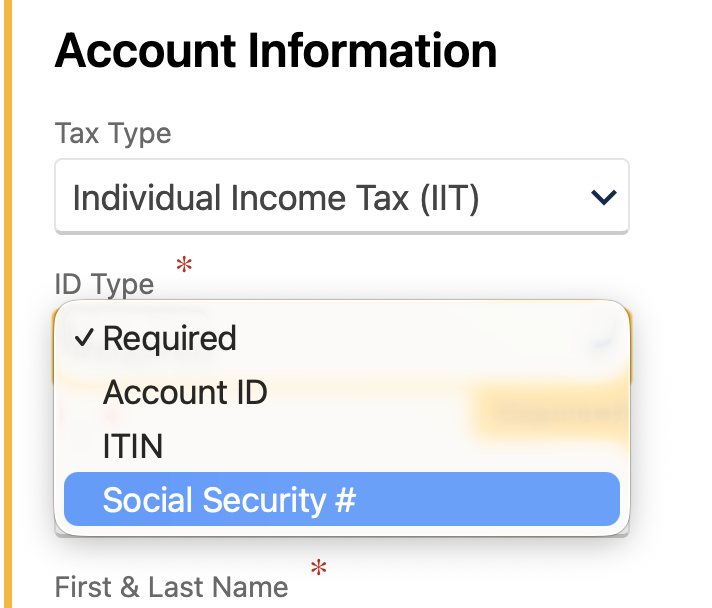
Then set ID Type to Social Security # and enter your SSN and name.
Step 3: Payment Information
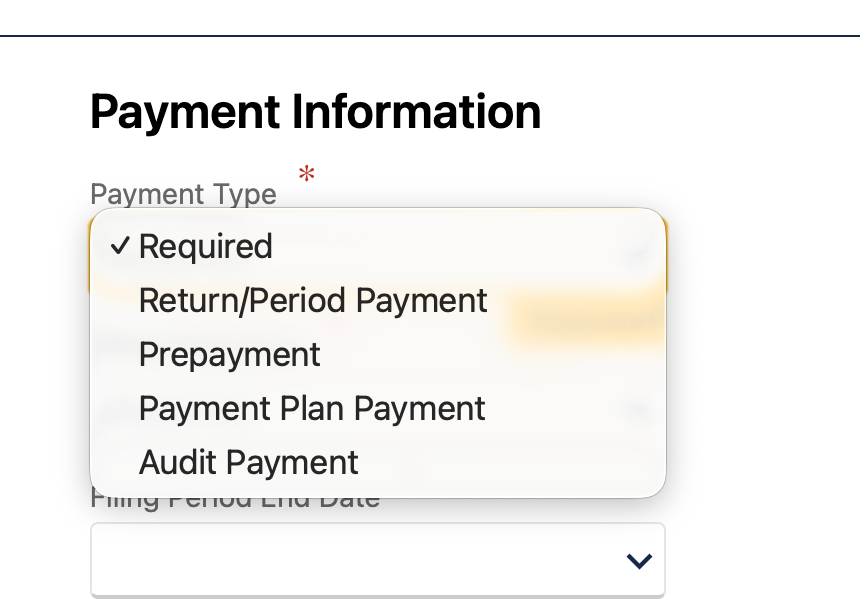
Under Payment Type, choose Return/Period Payment. This means you're paying the balance due on your annual tax return.
Our Toolbox. Every platform, plugin, and service we use and recommend, in one place. See the list →
Set the Filing Period End Date to December 31 of the tax year you're paying for. So if you're paying your 2025 taxes, that's 12/31/2025.
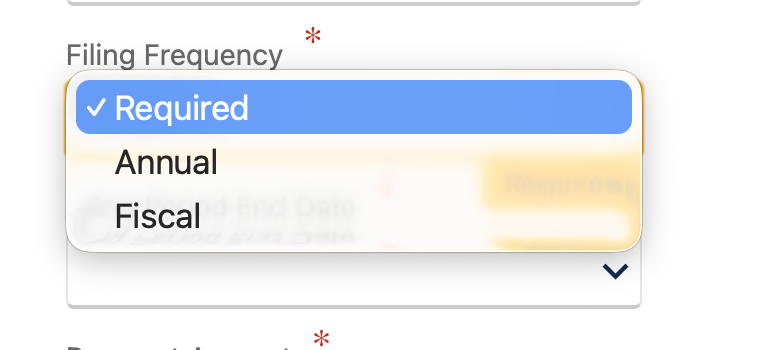
Set Filing Frequency to Annual.
Step 4: Enter Your Payment Amount and Bank Info
Enter the dollar amount you owe and your bank account details for ACH. If you'd rather use a credit or debit card, that's an option too.
Step 5: Submit and Save Your Confirmation
Hit submit and you'll get an immediate confirmation with a confirmation code and a representative number. Save both of those. You can print the confirmation or use the Printable View option.
One thing to know: the payment may take up to 10 days to process due to bank account verification. So don't panic if it doesn't show up right away.
Business vs Personal: Two Different Things
If you run a business (like an LLC), your business withholding taxes and your personal income taxes are completely separate on TAP. Your business account uses your EIN and has its own login. Your personal income tax uses your SSN and can be paid without logging in at all.
I actually started this whole process logged into my business account, thinking that's where I'd pay my personal taxes. It's not. Log out, go to the homepage, and use the Make a Payment flow with your Social Security number.
The AI Part
I used Claude Code to walk me through this. I'd show it my screen, it would tell me which option to pick, and we'd move to the next step. For something like taxes where you're staring at a dropdown with 20 options and thinking "I really hope I pick the right one," having an AI co-pilot takes the stress out of it.
This is one of those use cases people don't think about. AI isn't just for writing code or generating images. It's for the annoying, high-stakes admin work where you just want someone to say "yeah, that one."
Utah Tax Commission Contact Info
If you run into issues or need help:
- TAP Support: TAPSupport@utah.gov or 801-297-3996
- Business or Income Tax: Taxmaster@utah.gov or 801-297-2200 (800-662-4335)
- Collection Contact Center: 801-297-7703
See Also
- Claude Code - The AI tool I used to walk through this process
This article blends original content, AI-assisted drafting, and human oversight. How I write.
Stay Updated
Get notified when new content is published.
No spam. Unsubscribe anytime.