Email as Code: How to Edit 400 Emails in One Fell Swoop
Stay with me for a second. Infrastructure as code was the thing where you used to spin up servers by clicking buttons in a control panel. Then somebody said, what if a server was a text file? What if it had a defined CPU count, a defined region, a defined memory size, and you could check that text file into Git? Suddenly servers became reproducible, version-controlled, and reviewable.
Here is what that actually looks like in Terraform, the most common tool for the job.
provider "aws" {
  region = "us-west-2"
}

resource "aws_instance" "web" {
  ami           = "ami-0c2d3e23e757b5d84"
  instance_type = "t3.xlarge"  # 4 vCPUs, 16 GB RAM

  tags = {
    Name = "web-server"
  }
}
That is a whole server. Region, CPU, memory, name, all defined in nine lines of text. You change a line, you push to Git, the server changes. The same move is sitting right there for email.
What an email actually is
So what is an email at the end of the day? A subject line, maybe a preview, a body, an image or two, a call to action, and the day it goes out. That is the whole thing.
Once you write that down, an email is just structured text. And Claude Code is super good at structured text. Here is the actual welcome email from the Go-Kart Park sequence:
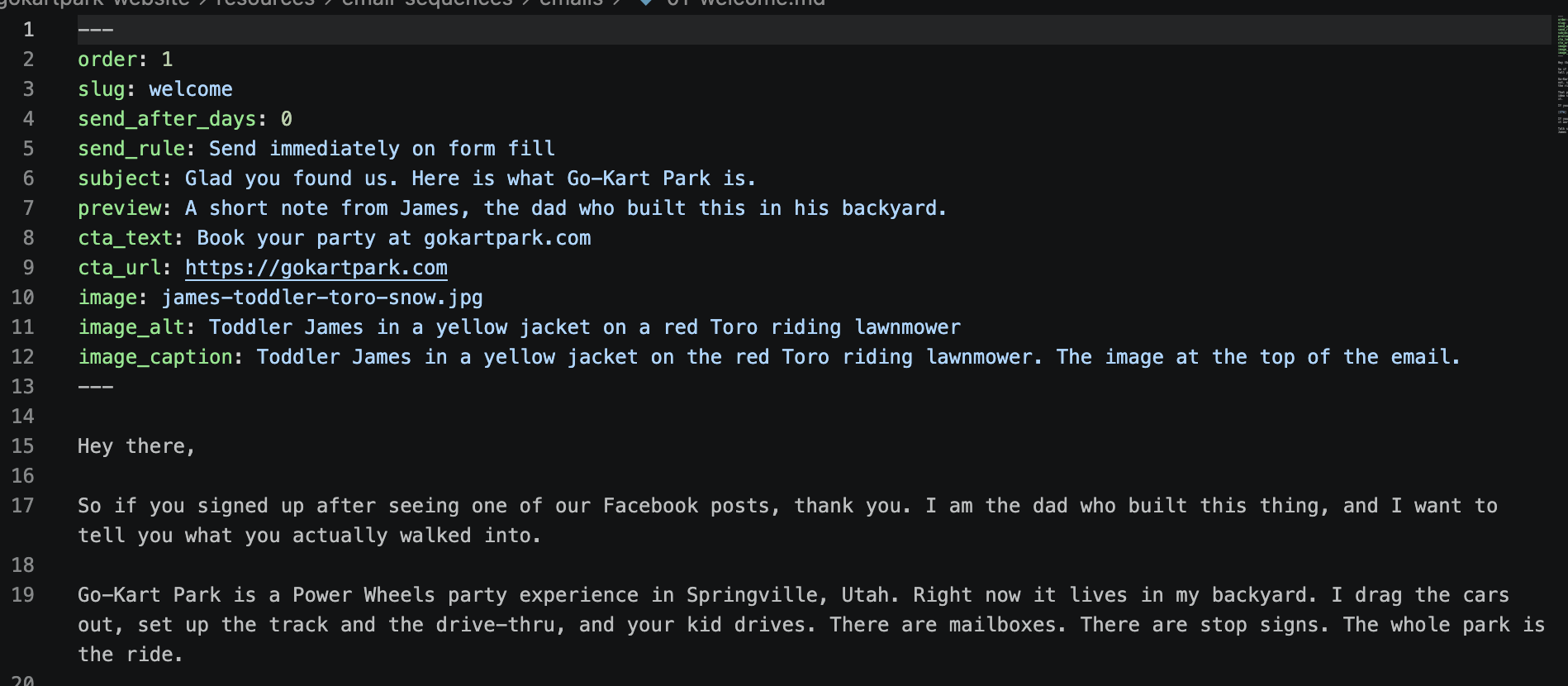
For Go-Kart Park, I sat down and brain-dumped the entire history of the business. Early parties, the first $60 booking, photos from when I was a kid running the place. I gave that raw material to Claude Code and said "here is everything you need to know, write me a welcome sequence." Out the other side came 13 emails, defined as code, sitting in a folder in GitHub. Subject, preview, body, image, and how many days after signup it sends.
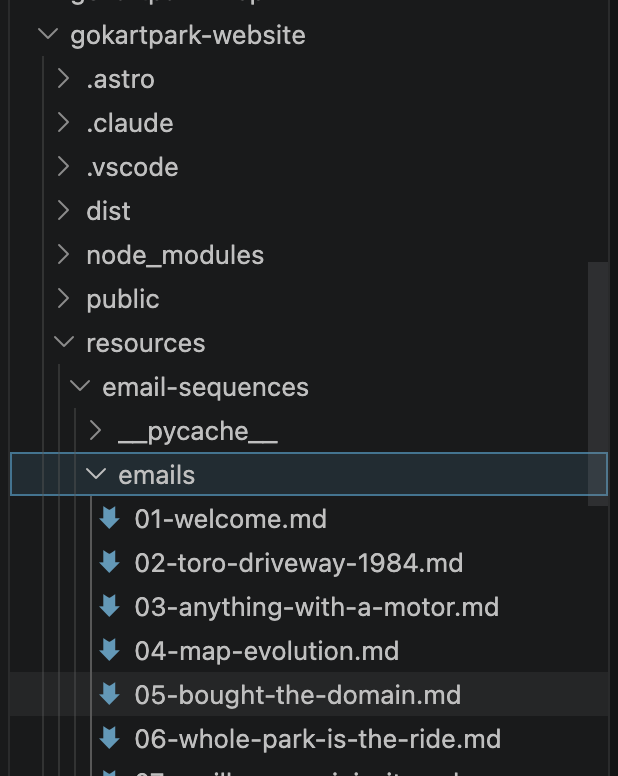
Then I told Claude to push the templates to Resend, the email sending service I am testing. Thirteen templates went live in the time it would take to manually drag and drop one of them in a traditional editor. The later 1,000-email Resend experiment shows how far the same method can scale.
Want to try this yourself? Start with Claude Code →
The bulk-edit superpower
Here is where it gets fun. Once your emails live in a folder of structured files, every editing job that used to take hours takes seconds.
This is the part that hit hardest on the call:
- Change the call to action across 400 emails. Big Black Friday push coming up? Switch every CTA on every email in your sequence to the new offer with one sentence to Claude.
- Fix a typo in your footer. That little spelling mistake hiding in your signature for the last six months, across every email you ever sent? Fix it everywhere at once.
- Update your logo. New brand refresh, swap the image reference in every template, no opening 47 emails one at a time.
- Swap the colors from one client to another. You built a beautiful nurture sequence for Client A. Client B just signed. Re-color, re-brand, swap the merge fields, deploy. The sequence becomes a template you can hand off.
- Fix the template itself. The layout was off, the buttons were too small, the spacing was wrong. Edit the template once and every email re-renders against the fix.
- Add your last name. Real moment from the call: I realized halfway through the demo that I had only put "James" in my signature. Two sentences to Claude. "Add Hurst, add my phone number, repush to Resend." All 13 emails updated and back in Resend before the next question got asked.
That is the move. That is what you cannot do in a traditional editor without burning an afternoon.
Our Toolbox. Every platform, plugin, and service we use and recommend, in one place. See the list →
What about HighLevel?
So a fair question came up on the call. "I am already inside HighLevel. I do not want to switch email providers. Does this still work?"
Yes.
You can take the HTML that Claude Code generates for each email and push it straight into HighLevel as a template. The structure of an email is the same no matter where it sends from.
Good news for the HighLevel folks. The programmatic push works. After the call I sat down and got it figured out. You give Claude Code your HighLevel Private Integration Token, point it at the Create Template version two endpoint, and say "push these 13 templates up." Done. The workflow I wished for during the demo is the actual workflow today.
So same source files, two destinations. Resend if you want a clean modern sending stack with their automation builder. HighLevel if you are already living in there. Either way, the writing and editing happens in code, and the source of truth lives in GitHub.
One thing to know up front. This requires you to be comfortable with GitHub. Not deep development, but enough to understand that your stuff lives in a repo, and that pushing changes is how it goes live. If that is brand new, last week's call covered it. The agency internal wiki with Claude Code walks through the same setup.
Where I am going with this
The original Infinite Nurture was a HighLevel build I did a couple of years back. I had spots for 400 emails, looped the contact back to the top when they reached the end, and called it good. In practice, I filled out about 60. Writing was the bottleneck.
With email as code, the bottleneck is gone. The goal now is 500. Eventually 1,000, then 10,000. When somebody joins one of my lists, I want to be ready to nurture them for life, and have every one of those emails editable at once when something changes.
If you make the move, tell me how it goes. We are all on the cutting edge of this together.
We are an independent affiliate of HighLevel and may earn a commission if you sign up through links on this page. We are not employees or representatives of HighLevel.
We are an independent affiliate of Claude Code and may earn a commission if you sign up through links on this page. We are not employees or representatives of Claude Code.
We are an independent affiliate of Seven Figure Agency and may earn a commission if you sign up through links on this page. We are not employees or representatives of Seven Figure Agency.
This article blends original content, AI-assisted drafting, and human oversight. How I write.
Stay Updated
Get notified when new content is published.
No spam. Unsubscribe anytime.