Highlevel
HighLevel Agency Success Report: Show Client Value
July 26, 2023•1 related topics
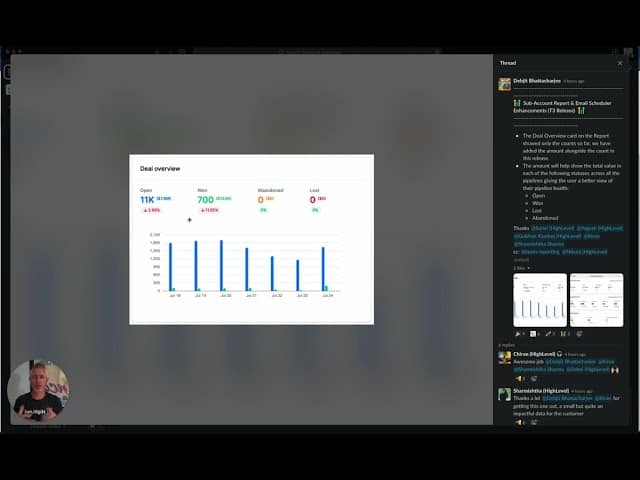
HighLevel's Agency Success Report now includes dollar amounts for deals, making it easier to demonstrate your value to clients.
Click on the image above to watch the full video.
What's New
The deal overview card now shows:
- Deal count — Number of deals created/won
- Dollar amounts — Total value of those deals
- Clear ROI — Clients see their return
Why This Matters
Reduce Churn
When clients see the results you're generating, they're less likely to cancel.
Prove Your Value
Hard numbers are more convincing than vague promises.
Our Toolbox. Every platform, plugin, and service we use and recommend, in one place. See the list →
Stay Top of Mind
Regular reports remind clients why they're paying you.
Justify Your Fees
If you're generating $50K in deals, your $2K/month fee looks reasonable.
How to Use the Report
- Go to Agency Settings → Reports
- Configure the Agency Success Report
- Set up automated sending (weekly, monthly)
- Clients receive branded reports showing their results
What's Included
The report shows:
- Contacts added
- Appointments booked
- Deals created
- Deal values (NEW)
- Emails sent
- SMS sent
- And more
Best Practices
- Send regularly — Monthly at minimum
- Personalize — Add context about specific wins
- Use your branding — White-label the report
- Follow up — Discuss results on calls
See Also
- HighLevel — The platform
See Also
This article blends original content, AI-assisted drafting, and human oversight. How I write.
Stay Updated
Get notified when new content is published.
No spam. Unsubscribe anytime.