Turn a Spare Roku TV Into an AI-Controlled Dashboard
I had a spare 32 inch Roku TV sitting on the floor of my office. I wanted it to be another screen, but not a monitor I plug into. I wanted a screen Claude Code could put things on when I asked. A unicorn, the weather, today's leads, my Facebook feed. All by just saying it.
It works. Here is the short I posted of it running.
This post walks through exactly how I set it up, including the parts that did not work the first time.
The Old Way
Putting a dashboard on a TV used to mean one of three things. Run a long HDMI cable from a computer. Buy a dedicated digital signage box with its own software and subscription. Or cast your screen and give up your laptop while it is casting.
All three put the TV in charge of you. I wanted the opposite. The TV sits there, and Claude decides what goes on it when I ask.
Why the Roku Alone Would Not Work
My first ask to Claude was simple: find the Roku on my network and turn it into a dashboard. It found the TV in a few seconds. Roku TVs answer on the local network and will tell you their model, name and which input is active.
Then it hit a wall. Roku has a remote control feature on the network, but on my TV it was set to "Limited" mode. In Limited mode the Roku will tell you what it is, but it will not let anything launch apps or press buttons. Claude could see the TV but could not drive it.
The Fix: A Fire TV Stick
I had an Amazon Fire TV stick already plugged into HDMI 1 on that TV. That stick is the real hero of this setup.
A Fire TV stick runs a version of Android, and Android has a developer feature called ADB (Android Debug Bridge). With ADB turned on, a computer on the same network can open apps, type text, press buttons and take screenshots of the TV. It is like handing Claude the remote, plus a pair of eyes.
The stick also comes with Amazon's Silk browser. That matters because the dashboard is just a web page. Claude opens Silk, points it at the page, and from then on anything it pushes to that page shows up on the TV.
So the Roku became the screen, and the Fire TV stick became the brains.
Skip the Stick If Your TV Already Runs the Right System
If you are shopping for a TV for this, you may not need the stick at all. Wi‑Fi alone is not enough, since my Roku had Wi‑Fi and still could not be driven. What matters is the system the TV runs.
| TV type | ADB built in? | Browser | Needs a stick? |
|---|---|---|---|
| Fire TV Edition TVs | Yes | Silk is included | No |
| Google TV or Android TV sets | Yes | Install one first | No |
| Roku TVs | No | No | Yes |
| Samsung and LG | Their own developer modes | Built in | A stick is the easier route |
A Fire TV Edition TV runs the same software as the stick, so every step below works on it with no extra hardware.
Turning On ADB Debugging
This part is done with the Fire TV remote. The developer menu is hidden until you unlock it.
- Press Home, then open Settings (the gear icon).
- Open My Fire TV. On some versions it is called Device & Software.
- Open About.
- Highlight the first item, your device name, and press Select 7 times in a row. A message says you are now a developer.
- Press Back once. Developer Options now shows up in the My Fire TV menu.
- Open Developer Options and turn on ADB debugging.
- The first time your computer connects, the TV shows an "Allow USB debugging?" prompt. Tick Always allow from this computer and press OK.
That last prompt is the only security gate. Once you approve your computer, it can connect any time without asking again.
The Address Problem
My first connection failed. Claude had guessed which device on my network was the Fire TV, and it guessed wrong. There was a different Amazon device on the network, and the stick itself had a different address than expected.
The fix was to stop guessing. ADB listens on port 5555, so Claude scanned my whole home network for anything with port 5555 open. One device answered, and that was the Fire TV. Routers hand out new addresses from time to time, so the script that opens the dashboard now runs that scan every time instead of trusting a saved address.
Our Toolbox. Every platform, plugin, and service we use and recommend, in one place. See the list →
What Claude Built
While I was turning on ADB, Claude built the other half: a tiny web server on my Mac Studio. It does one job. It serves a fullscreen page that shows whatever was pushed to it last, and the page checks for something new every two seconds.
Claude can push three kinds of things to it:
- An image, like the unicorn it generated for me
- An HTML page, like a weather card or a leads summary
- A live URL from another app on my network
From my first message to the unicorn on the screen took 15 minutes. Then I asked for the unicorn, the weather and today's leads one after another, and they showed up on the TV ten seconds apart.
Here is what this unlocks. Any time I can describe something, Claude can make it and put it on the wall. A countdown for a party. A chart of this week's leads. A unicorn, just for fun.
Need help setting this up? Create a ticket today →
The Rotator for Sites That Refuse to Embed
Next I asked for Facebook, the KSL news site and the admin page for my business, rotating every 15 seconds.
Those sites refuse to load inside another page. That is a security setting on their end, and it is a good one. So instead of loading them inside the dashboard, Claude drives Silk directly over ADB and tells it to open each address in turn.
Two lessons came out of building it:
- Silk does not need to be closed and reopened to switch pages. Sending it a new address while it is open works fine and is much faster.
- When a script reads a list of addresses and calls ADB for each one, ADB can quietly eat the rest of the list. The fix is a single flag (adb shell -n) that tells it not to read that input.
Logging In on the TV
I asked Claude to log the TV into Facebook. It typed my credentials through ADB, entered the two factor code, and saved the login so the TV stays signed in. It also found a toggle in Silk's toolbar that switches between the mobile and desktop versions of a site, so Facebook shows the full desktop layout.
My business admin page sits behind Cloudflare's email code login. Claude read the code from my email and entered it.
One lesson here: a TV screen is public. The first password attempt landed in the wrong field and was visible on the screen. Claude now checks that the password field is focused and empty before typing, and only takes a screenshot of the TV when the field is masked.
Reaching It From Anywhere
The last step was putting the Fire TV on Tailscale, the free private network I already use for all my machines. Tailscale has an Android app that installs on the Fire TV. Once the TV joined, Claude could reach it over ADB from any of my machines, at home or not, without the address problem coming back.
Downsides
- Silk's toolbar takes up the top of the screen. Dashboard pages need to scale themselves to fit the space below it.
- Typing on a TV is clumsy. The on-screen keyboard pops up over text fields, and pressing Enter can type a letter instead of submitting.
- Some sites will not load inside the dashboard. You need the rotator approach for those.
- ADB is real access. Anyone you approve can control the TV, so only approve your own computers.
- Time. My first time through, from my first message to the logged-in rotator on Tailscale, was about an hour, dead ends included. Turning on ADB is a one-time toggle, so you only pay that part once.
Where This Idea Came From
I do almost everything by voice now. I dictate to Claude, it does the work, and it talks back to me. So I had this picture in my head of walking into a room with screens everywhere. Each screen is a dashboard. Each one belongs to a different agent, and maybe each agent has its own voice, since there are so many voices to choose from now. I am walking on a treadmill in the middle of it all, talking, orchestrating and dictating to my bots.
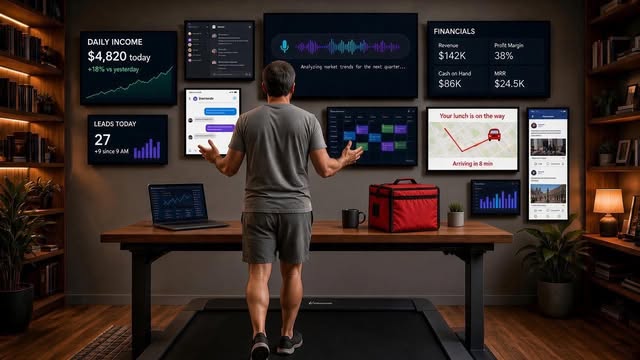
The spare Roku TV is dashboard number one.
If you have a spare TV and a Fire TV stick in a drawer somewhere, give it a try. It is a super fun build, and once Claude can put things on a screen across the room, you start thinking of new things to put there.
See Also
See Also
Some links in this article are affiliate links. If you purchase through them, we may earn a commission at no extra cost to you. This helps support our content.
This article blends original content, AI-assisted drafting, and human oversight. How I write.
Stay Updated
Get notified when new content is published.
No spam. Unsubscribe anytime.