Text to Diagram: Voice to Visual in Seconds
Text to Diagram: Voice to Visual in Seconds
I've never been patient enough to sit and drag boxes around to make a flowchart. But I need diagrams all the time—especially when building out N8N workflows or HighLevel automations. Here's the trick I've been using.

Click on the image above to watch the full video.
The Problem
You've got an idea in your head. Maybe it's an automation workflow, maybe it's a process you want to document. You could:
- Open a diagramming tool
- Drag boxes
- Type labels
- Draw arrows
- Realize you forgot a step
- Rearrange everything
Or you could just talk.
The Workflow
Step 1: Voice dictate to Claude
Just start talking. Describe your workflow out loud, even if you're rambling and stuttering. Something like:
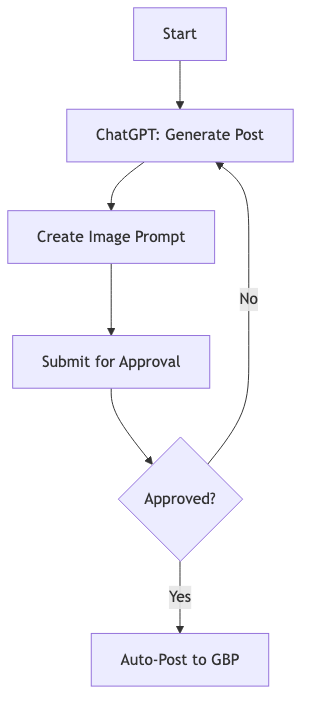
"Hey, so I've got this workflow where there's a ChatGPT step where I say 'Hey, I'm this handyman in Springville, Utah' and I want it to pretend to be a social media pro that's going to automatically post. It needs to know today's date, create a Google Business Profile post, come up with the image generation prompt, then submit for approval. If they click yes, it posts automatically. If not, it generates another one."
Don't worry about being polished. Claude (or ChatGPT) will clean it up.
Step 2: Ask for Mermaid format
End your dictation with: "Can you please turn this into a Mermaid style text diagram?"
Our Toolbox. Every platform, plugin, and service we use and recommend, in one place. See the list →
Claude will output Mermaid code, which renders into a flowchart like this:
Step 3: Paste into Excalidraw
Excalidraw is free. Open it, click the "Text to Diagram" feature, paste your Mermaid code, and hit Generate.
You get a clean, editable flowchart in seconds.
Why This Works
It's like letting your brain breathe. Instead of fighting with a diagramming tool, you just explain what you're thinking—messy, incomplete, whatever—and AI handles the structure. Then the visual tool handles the layout.
All I had to do was talk, and I got a diagram I can actually tweak and use.
Tools Used
- Claude or ChatGPT — For cleaning up voice notes and generating Mermaid code
- Excalidraw — Free diagramming tool with text-to-diagram feature
- Mermaid — The text-based diagram syntax that bridges AI output to visual tools
When to Use This
- Planning N8N or HighLevel workflows before building
- Documenting processes for clients or team members
- Sketching out ideas quickly during a call
- Creating visuals for content or presentations
The next time you catch yourself dreading "I should probably make a diagram for this"—just talk instead.
See Also
Some links in this article are affiliate links. If you purchase through them, we may earn a commission at no extra cost to you. This helps support our content.
This article blends original content, AI-assisted drafting, and human oversight. How I write.
Stay Updated
Get notified when new content is published.
No spam. Unsubscribe anytime.