Google Business Profile API Access
The Google Business Profile API is the programmatic door to the same data a business owner manages through the GBP dashboard. Hours, categories, posts, photos, reviews, Q&A, insights — read and write, from a script.
This post walks through what the API unlocks, who should apply, the eligibility rules that decide whether Google approves you, and the steps to submit the application.
Google Business Profile is the single most important asset a local business has. The free listing that shows up when somebody searches "plumber near me" or "best burger in Provo." It owns your hours, your phone number, your reviews, your photos, your posts, and the insights that tell you how many people called you this week.
All of that sits behind a Google account and a web interface. You can manage one profile by logging in. You can manage ten by opening ten tabs. The second you are running anything at scale, or tying GBP into the same systems that handle your CRM and your website and your email, the web interface becomes the bottleneck.
The API removes the bottleneck. Same data, same read and write access, from a script. And because Google watches things like review reply rate and how complete and current your listing is when it ranks local results, the script doing the work in the background is doing more than saving time. It is buying you visibility in the most valuable real estate on the search results page.
Who Should Apply
If you manage one profile for your own business, you probably do not need the API. The dashboard is fine.
Apply if any of these describe you:
- You manage multiple locations, either your own or on behalf of clients.
- You want to automate review replies, post scheduling, or bulk hours updates.
- You are piping GBP data into a CRM, dashboard, or content pipeline.
- You are building a tool other people will use to manage their profiles.
Eligibility Rules
Google does not hand the API out freely. The application asks what you plan to do with it, how many profiles you manage, and whether you are building for yourself or for others.
One rule trips up most applicants:
A requestor's email should be an owner/manager of a listing that has been verified for 60+ days.
The email you apply with has to show up on the owner or manager list of a live Google Business Profile, and that role has to be at least 60 days old. If you added yourself as a manager recently, wait the rest of the 60 days, or apply with a different email that already qualifies.
Before you apply, open the People tab on the profile you plan to reference and confirm three things:
- The applicant email is on the list.
- The role is Owner or Manager (not Site Manager).
- That access is older than 60 days.
If it is not, either wait out the 60 days or apply with a different email that already qualifies.
What the API Unlocks
Once you are approved, the API opens up a long list of endpoints. The ones worth knowing:
Business information. Read and write the listing itself — name, categories, phone, website, description, service area, attributes (wheelchair accessible, free wifi, LGBTQ+ friendly, and so on). If your hours need to change across 30 locations, one script can do it in seconds.
Hours. Regular hours, holiday hours, and secondary hours types like drive-thru, delivery, and pickup. The API treats these as first-class data, so you can push a holiday schedule out in one pass instead of clicking through each profile.
Local Posts. What's New, Event, and Offer posts with images and call-to-action buttons. Same thing Google lets you create by hand, but now you can schedule them, rotate them across locations, or generate them from whatever content system you already have.
Photos and videos. Upload logos, cover photos, interior shots, exterior shots, team photos, product photos, and short videos (up to about 30 seconds, 75MB). The API does not just handle text — you can push media the same way.
Reviews. Read every review that comes in, and post replies through the API. No more logging into the dashboard to reply to a one-star. No more forgetting to respond. The review loop can close itself.
Questions and answers. The Q&A section on the profile. Read new questions, post answers. Customers ask the same five things over and over, and now you can answer them once in code.
Service items. Structured services with descriptions and prices. If you run a service business and you actually care about showing up in "near me" searches, the services section is where Google pulls half of its ranking signal.
Our Toolbox. Every platform, plugin, and service we use and recommend, in one place. See the list →
Performance insights. Calls, direction requests, website clicks, search impressions (split between direct searches for your name and discovery searches for your category), photo views. The same numbers the dashboard shows you, but in a format you can pipe into a dashboard of your own.
Verifications. Check verification status, start a new verification, respond to a verification challenge.
Attributes. The long list of yes and no flags Google shows below your business name. Pet friendly, outdoor seating, veteran owned. You can set these in bulk.
What Not to Do With It
The GBP API is not a megaphone for spam. Google's policies are clear about automated posting that looks inauthentic, review replies generated without human oversight, and anything that feels like manipulation. If you use the API to flood your profile with low-effort posts, Google will suspend you, and recovering a suspended profile is a completely different kind of nightmare.
The point of the API is not to do more faster. It is to do the same work — real posts, real replies, real updates — with less friction.
Example Workflows
A few patterns the API makes possible:
- A Claude Code setup that replies to reviews through the same loop that handles customer messages.
- A content pipeline that pushes posts to Google Business Profile the same way it posts to Facebook and LinkedIn, without a third-party social scheduler in the middle.
- Performance numbers that show up in daily dashboards next to the numbers from Google Search Console and Google Analytics.
- A single push that propagates hours changes, new categories, or new services to every relevant profile at once.
Nothing exotic. Just workflows that used to live in browser tabs, now living in scripts.
How to Apply
The application lives at the Google Business Profile Help center, not in your Cloud Console. Open the form here: support.google.com/business/contact/api_default.
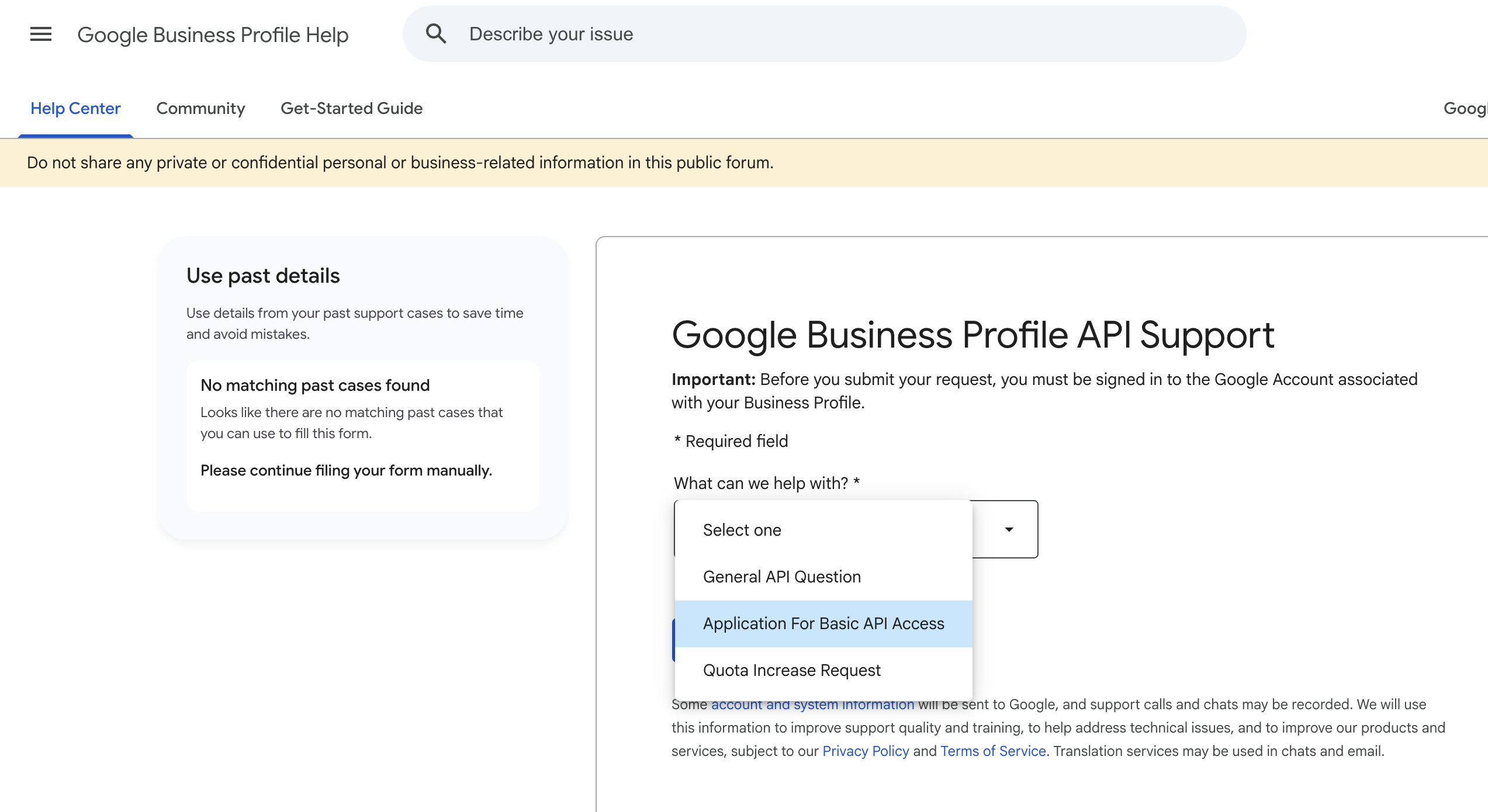
Sign in with the Google account that owns the profile you want to manage. Then on that page, find the dropdown labeled "What can we help with?" and pick "Application For Basic API Access." The page shifts to show a blue button labeled "Apply for Google Business Profile API access" — click that to launch the wizard.
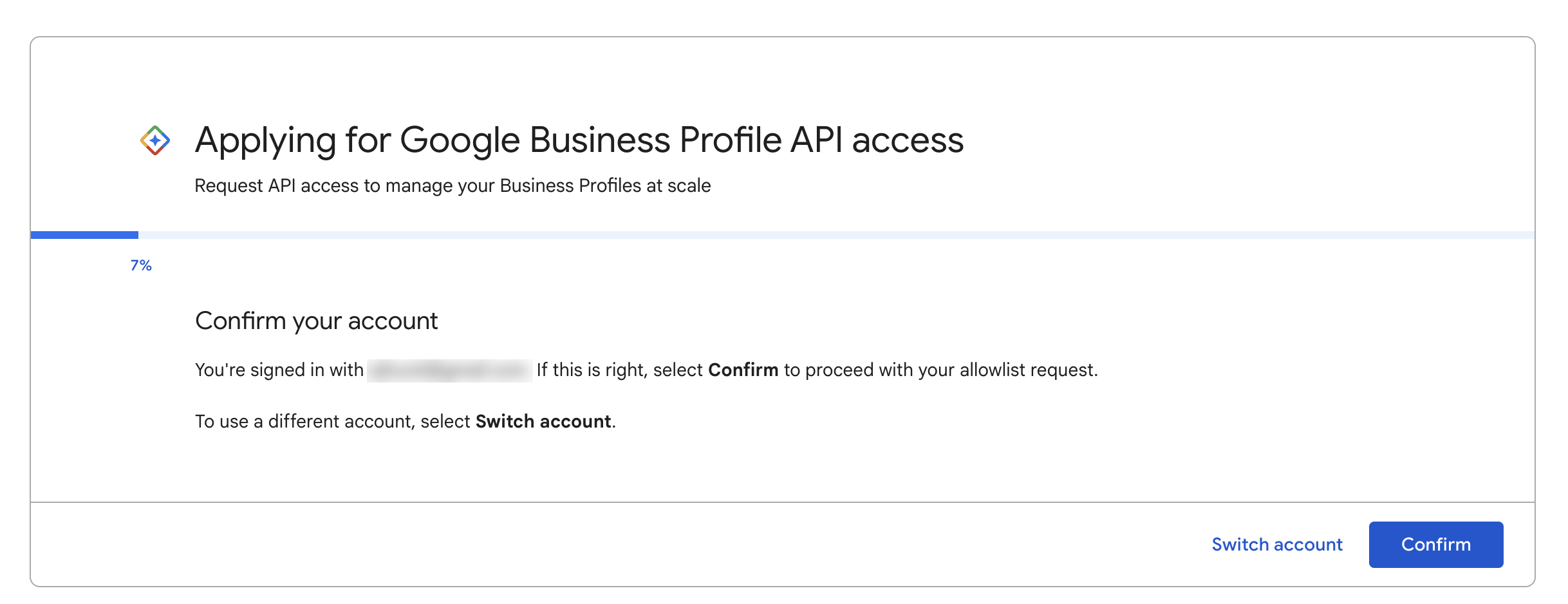
Step 1 — Confirm your account. The wizard reads which Google account you are signed in as and asks you to confirm before doing anything. This is the email Google checks against the 60-day owner rule, so make sure you are signed in as the right one. Use Switch account if not.
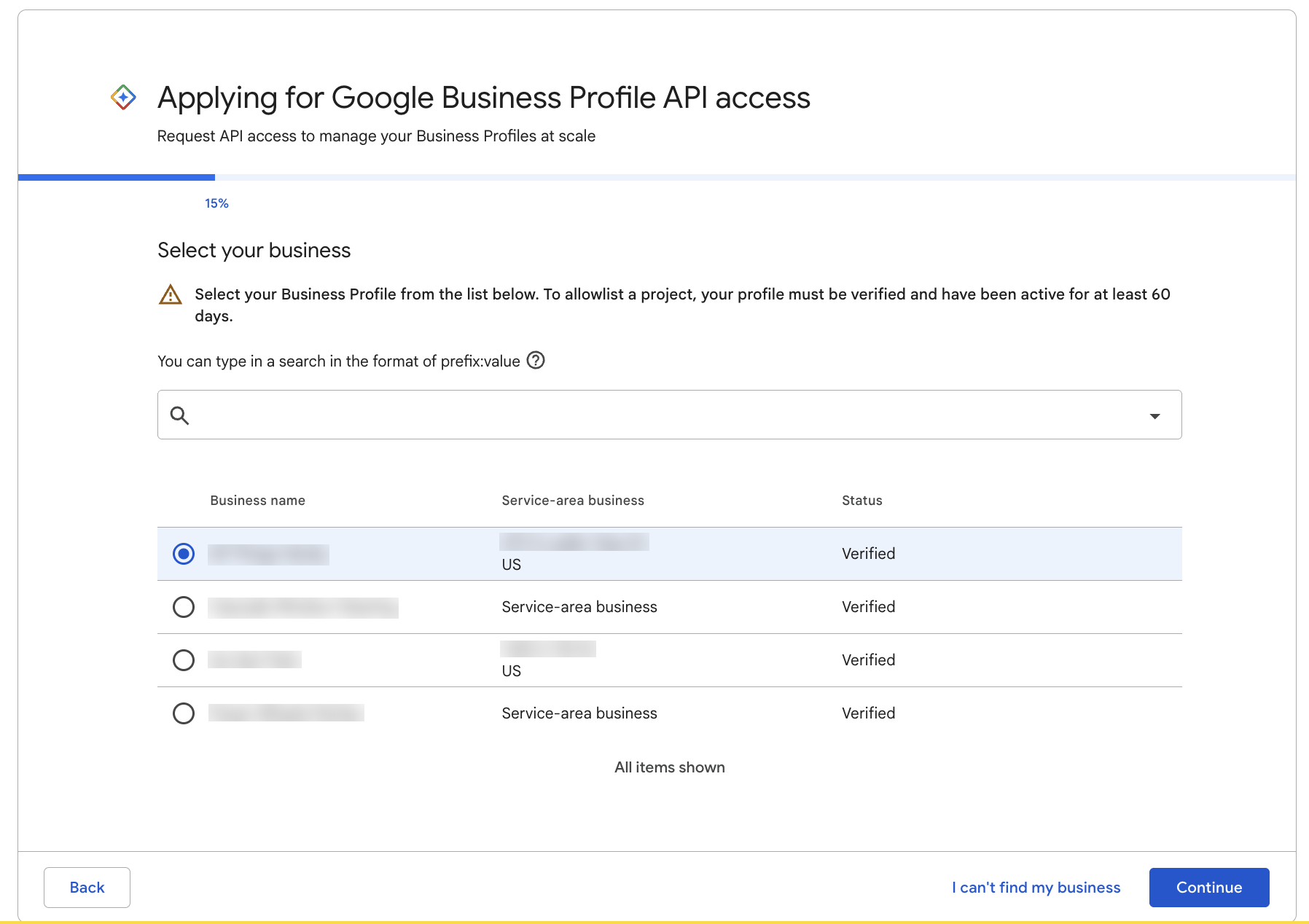
Step 2 — Select your business. The wizard pulls every profile you manage and asks you to pick the one this allowlist request is for. Read the warning at the top — your profile must be verified and have been active for at least 60 days. This is the bar the application checks against.
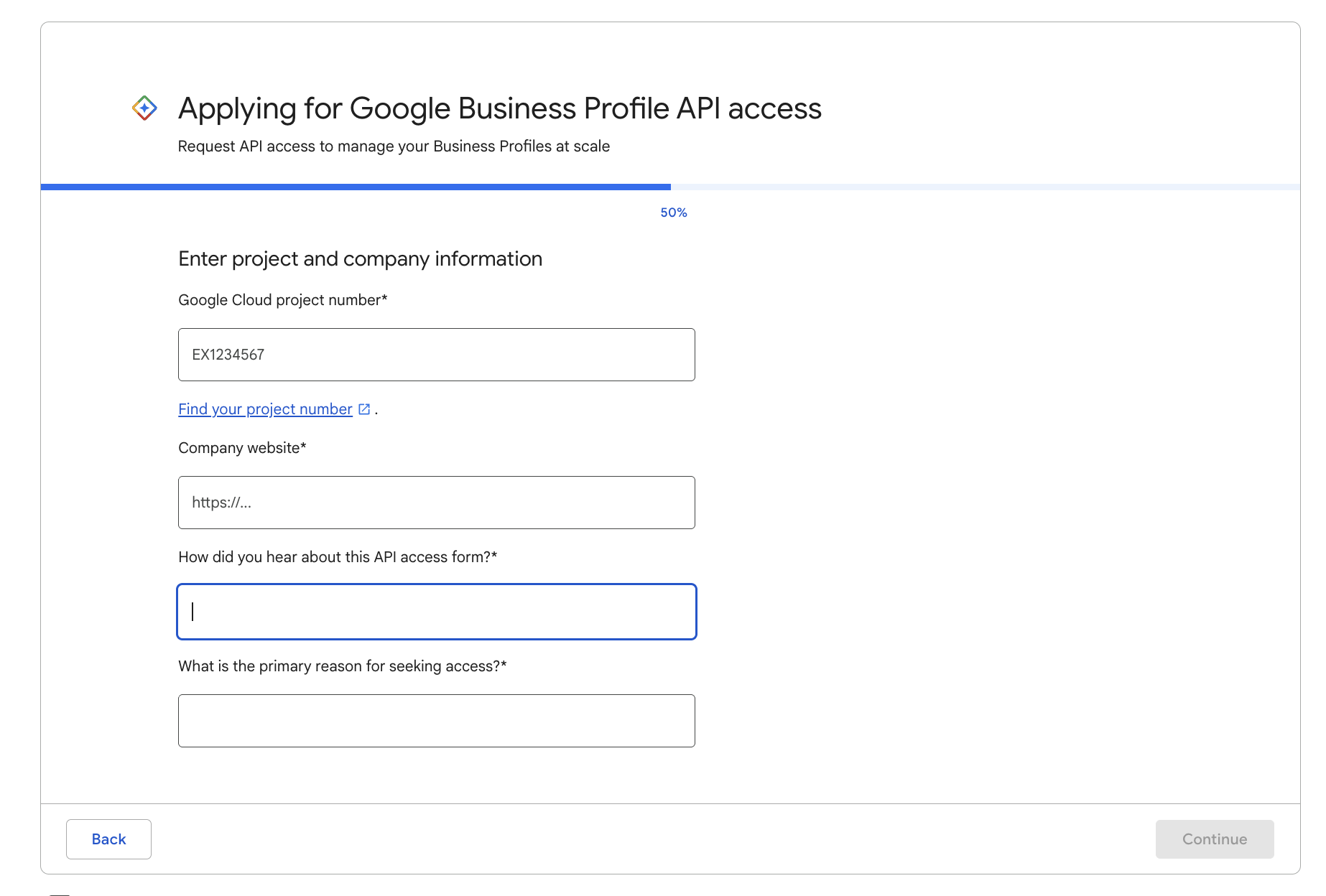
Step 3 — Project and company information. This ties a specific Google Cloud project to your access. Four fields:
- Google Cloud project number — not the project ID, the number. There is a "Find your project number" link right under the field that takes you straight to it in the Cloud Console.
- Company website — plain URL, has to match the business listed on your profile.
- How did you hear about this API access form — free text. A short, honest answer is fine.
- What is the primary reason for seeking access — free text, and the most important field. Be specific. "Auto-reply to customer reviews across multiple locations" or "bulk update business hours for 30 client profiles" lands better than "for automation."
The remaining wizard screens collect a bit more detail about your use case and ask you to accept the API terms. Submit, and you wait.
Expect a response in one to two weeks. Approval comes back as an email from googlebusinessprofile-support@google.com with a support ticket number and a "Congratulations" message. Once approved, the unlock is project-level — every profile tied to that Cloud project is now reachable through the API.
If you manage one Google Business Profile for your own business, stick with the dashboard. But if you are building anything that connects a CRM, a website, an email system, and a set of local listings — and you want them to actually talk to each other without a human in the middle — the API is the piece that makes it real.
See Also
- Google Business Profile (GMB) — the listing itself and why it matters for local SEO
- Google Search Console — the web search side of the same story
- Claude Code — how I wire any API into a workflow
- Claude Code Deterministic Pattern — the two-layer architecture this plugs into
See Also
This article blends original content, AI-assisted drafting, and human oversight. How I write.
Stay Updated
Get notified when new content is published.
No spam. Unsubscribe anytime.