16 Domains Added to Search Console in 2 Minutes
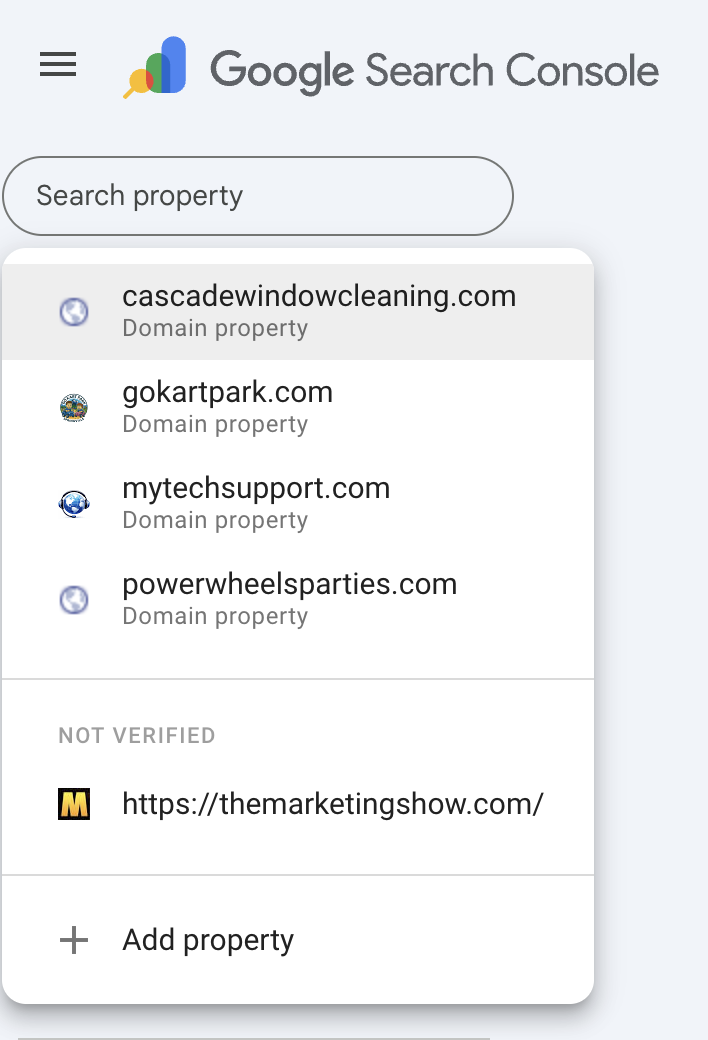
I manage 16 domains on Cloudflare. This morning I opened Google Search Console and realized only four of them were actually verified. Four out of sixteen. The other twelve had never been added. That means no search performance data, no indexing reports, no crawl error alerts. For domains that have been live for months, that's a lot of missed visibility.
The Old Way
So here's what adding a single domain to Google Search Console normally looks like:
- Log into Search Console
- Click "Add property"
- Choose "Domain" (the better option — covers all subdomains and protocols)
- Google gives you a DNS TXT record to prove you own the domain
- Open a new tab, log into Cloudflare
- Find the right domain
- Go to DNS settings
- Add a new TXT record, paste in the verification string
- Go back to Search Console
- Click "Verify"
- Hope DNS has propagated. If not, wait and try again
That's one domain. I needed to do twelve more. At maybe 3-5 minutes each, that's 45 minutes to an hour of clicking between tabs, copying strings, and waiting for DNS.
I did not do that.
Only adding one domain? The single-domain version of this workflow lives in Got a New Domain? The Day One Search Console Playbook — same APIs, same prereqs, scoped to the moment you launch one fresh site.
The New Way
I opened Claude Code and said "add all my Cloudflare domains to Google Search Console." The whole thing took about two minutes.
Here's what actually happened behind the scenes:
- Claude Code pulled my domain list from the Cloudflare API
- Checked which domains were already verified in Search Console
- For each missing domain, it called Google's Site Verification API to get the DNS token
- Added the TXT record to Cloudflare via their API
- Waited a few seconds for DNS propagation
- Triggered verification through Google's API
- Confirmed all 16 domains verified as owner
No tab switching. No copy-pasting verification strings. No "click verify, wait, try again." The APIs talked to each other and I watched it happen in the terminal.
What You Need to Set This Up
If you want to do this yourself, here's what you need before running the script:
1. Cloudflare API Key
Log into your Cloudflare dashboard. Go to My Profile > API Tokens > Global API Key. You need the Global API Key (not a scoped token) because it needs access to all your zones.
You will also need the email address associated with your Cloudflare account.
2. Google Cloud Project
You need a Google Cloud project with two APIs enabled:
- Google Search Console API (also called Web Search API / Webmasters API)
- Google Site Verification API
Go to the Google Cloud API Library, search for each one, and click Enable.
3. OAuth Credentials
In the same Google Cloud project, create OAuth 2.0 credentials:
- Go to APIs & Services > Credentials
- Click Create Credentials > OAuth client ID
- Choose Desktop app
- Download the JSON file and save it somewhere accessible
The first time the script runs, it will open a browser window asking you to sign in with your Google account and grant permissions. After that, it saves a token file so you do not have to sign in again.
Our Toolbox. Every platform, plugin, and service we use and recommend, in one place. See the list →
The OAuth scopes you need are:
- https://www.googleapis.com/auth/webmasters — for adding sites to Search Console
- https://www.googleapis.com/auth/siteverification — for DNS verification tokens
4. Python Libraries
pip3 install google-auth google-auth-oauthlib google-api-python-client requests
The Prompt I Used
I can give you the exact Python script that Claude Code wrote — it is below. But honestly, here is the Claude Code prompt I used. If you have Claude Code set up, paste this in and it will handle everything.
One thing you might be thinking: "Am I really supposed to paste my API key into an AI tool?" Fair question. Claude Code runs entirely on your machine — your keys stay in your local terminal. Anthropic says they do not use your inputs for training data, so your credentials should not be going anywhere. But if that still feels uncomfortable, save your credentials in a local file (like a .env in your home directory) and reference the file path in the prompt instead of the raw keys. Claude Code can read files, so it will grab them from there. Either way works.
I have domains on Cloudflare and I want all of them added to Google Search Console. My Cloudflare Global API Key is [YOUR_KEY] and my Cloudflare email is [YOUR_EMAIL]. I have a Google Cloud project with OAuth credentials saved at [PATH_TO_CLIENT_SECRETS.JSON]. Please:
- Pull all my domains from the Cloudflare API
- Check which ones are already verified in Google Search Console
- For each missing domain, get a DNS verification token from Google's Site Verification API
- Add the TXT record to Cloudflare via their API
- Verify each domain through the API
Make sure the Google Cloud project has both the Search Console API and Site Verification API enabled. If my OAuth token needs the webmasters and siteverification scopes, handle the re-auth.
Claude Code will install the Python libraries if needed, handle the OAuth flow, and work through any errors along the way. That is the beauty of it — you do not need to debug API responses or read documentation. You describe what you want and it figures it out. When the Site Verification API was not enabled on my Google Cloud project, Claude Code told me, opened the page, and re-ran the script after I clicked Enable. That kind of back-and-forth is where it shines.
Need help setting this up? Create a ticket on MyTechSupport.com — vetted specialists who can walk you through the whole thing.
The Full Script
I can also give you the exact Python that Claude Code wrote for me. If you want to run this without Claude Code, save it as bulk-verify-domains.py and update the three config variables at the top.
Click to expand the full Python script
cat <<'PYTHON' > bulk-verify-domains.py
import os, json, requests, time
from google.oauth2.credentials import Credentials
from google_auth_oauthlib.flow import InstalledAppFlow
from google.auth.transport.requests import Request
from googleapiclient.discovery import build

# ============================================================
# CONFIG — Update these three values
# ============================================================
CF_EMAIL = "your-cloudflare-email@example.com"
CF_KEY = "your-cloudflare-global-api-key"
CLIENT_SECRETS_FILE = "client_secrets.json"  # OAuth JSON from Google Cloud
TOKEN_FILE = "token.json"                     # Auto-created after first login

# ============================================================
# Google OAuth Setup
# ============================================================
SCOPES = [
    "https://www.googleapis.com/auth/webmasters",
    "https://www.googleapis.com/auth/siteverification",
]

def get_google_credentials():
    creds = None
    if os.path.exists(TOKEN_FILE):
        creds = Credentials.from_authorized_user_file(TOKEN_FILE, SCOPES)
    if not creds or not creds.valid:
        if creds and creds.expired and creds.refresh_token:
            creds.refresh(Request())
        else:
            flow = InstalledAppFlow.from_client_secrets_file(CLIENT_SECRETS_FILE, SCOPES)
            creds = flow.run_local_server(port=0)
        with open(TOKEN_FILE, "w") as f:
            f.write(creds.to_json())
    return creds

# ============================================================
# Cloudflare Setup
# ============================================================
CF_HEADERS = {
    "X-Auth-Email": CF_EMAIL,
    "X-Auth-Key": CF_KEY,
    "Content-Type": "application/json",
}

def get_cloudflare_domains():
    resp = requests.get(
        "https://api.cloudflare.com/client/v4/zones?per_page=50",
        headers=CF_HEADERS,
    )
    return {z["name"]: z["id"] for z in resp.json()["result"]}

def add_txt_record(zone_id, domain, token):
    # Check if TXT record already exists
    existing = requests.get(
        f"https://api.cloudflare.com/client/v4/zones/{zone_id}/dns_records?type=TXT&name={domain}",
        headers=CF_HEADERS,
    ).json()
    if any(r["content"] == token for r in existing.get("result", [])):
        return True  # Already exists

    resp = requests.post(
        f"https://api.cloudflare.com/client/v4/zones/{zone_id}/dns_records",
        headers=CF_HEADERS,
        json={"type": "TXT", "name": domain, "content": token, "ttl": 1},
    )
    return resp.json().get("success", False)

# ============================================================
# Main
# ============================================================
def main():
    print("Authenticating with Google...")
    creds = get_google_credentials()
    verify_svc = build("siteVerification", "v1", credentials=creds)
    webmasters = build("webmasters", "v3", credentials=creds)

    # Get already-verified domains
    sites = webmasters.sites().list().execute()
    verified = set()
    for s in sites.get("siteEntry", []):
        if s["permissionLevel"] != "siteUnverifiedUser":
            url = s["siteUrl"]
            verified.add(url.replace("sc-domain:", "") if url.startswith("sc-domain:") else url)

    # Get Cloudflare domains
    zone_map = get_cloudflare_domains()
    print(f"Found {len(zone_map)} domains on Cloudflare\n")

    results = {"verified": [], "added": [], "pending": [], "failed": []}

    for domain, zone_id in sorted(zone_map.items()):
        if domain in verified:
            print(f"  SKIP  {domain} — already verified")
            results["verified"].append(domain)
            continue

        print(f"  ADD   {domain}...")

        # Step 1: Get DNS verification token
        try:
            token_resp = verify_svc.webResource().getToken(
                body={
                    "site": {"type": "INET_DOMAIN", "identifier": domain},
                    "verificationMethod": "DNS_TXT",
                }
            ).execute()
            dns_token = token_resp["token"]
        except Exception as e:
            print(f"        ERROR getting token: {e}")
            results["failed"].append(domain)
            continue

        # Step 2: Add TXT record to Cloudflare
        if not add_txt_record(zone_id, domain, dns_token):
            print(f"        ERROR adding DNS record")
            results["failed"].append(domain)
            continue

        # Step 3: Add to Search Console
        try:
            webmasters.sites().add(siteUrl=f"sc-domain:{domain}").execute()
        except Exception:
            pass  # May already exist as unverified

        # Step 4: Wait for DNS, then verify
        time.sleep(3)
        try:
            verify_svc.webResource().insert(
                verificationMethod="DNS_TXT",
                body={"site": {"type": "INET_DOMAIN", "identifier": domain}},
            ).execute()
            print(f"        VERIFIED")
            results["added"].append(domain)
        except Exception:
            print(f"        PENDING — DNS may need more time")
            results["pending"].append(domain)

    # Retry pending after a delay
    if results["pending"]:
        print(f"\nWaiting 15 seconds for DNS propagation...")
        time.sleep(15)
        still_pending = []
        for domain in results["pending"]:
            try:
                verify_svc.webResource().insert(
                    verificationMethod="DNS_TXT",
                    body={"site": {"type": "INET_DOMAIN", "identifier": domain}},
                ).execute()
                print(f"  VERIFIED  {domain}")
                results["added"].append(domain)
            except Exception:
                still_pending.append(domain)
        results["pending"] = still_pending

    # Summary
    print(f"\n{'='*50}")
    print(f"Already verified: {len(results['verified'])}")
    print(f"Newly verified:   {len(results['added'])}")
    if results["pending"]:
        print(f"Still pending:    {len(results['pending'])} (retry in a few minutes)")
    if results["failed"]:
        print(f"Failed:           {len(results['failed'])}")
    print(f"{'='*50}")

if __name__ == "__main__":
    main()
PYTHON
Then run it:
python3 bulk-verify-domains.py
The first run opens your browser for Google sign-in. After that, the token is cached and it runs silently.
If any domains show as "pending," just run the script again after a minute or two. DNS propagation on Cloudflare is fast but not always instant.
The Bigger Picture
This is a pattern I keep running into with Claude Code. Something that should take an hour of manual clicking turns into a two-minute API conversation. The last time this happened, I got a scary email from Search Console about indexing issues — Claude Code diagnosed the problem, fixed the code, and built me an API client I did not ask for but use every day.
The thing that makes this work is that Cloudflare and Google both have good APIs. Claude Code knows how to talk to them. You just need to provide the credentials and describe what you want. The manual tab-switching workflow exists because most people do not know the APIs are there — or they do not want to spend two hours reading API docs for a one-time task. Claude Code eliminates that gap.
If you have never used Claude Code before, Your First Day With Claude Code walks you through the entire setup from scratch. Zero coding experience required.
See Also
- The 100 Step New Site Checklist — The master list of everything you do for a new domain, from buying it through maintenance
- Got a New Domain? The Day One Search Console Playbook — The single-domain version of this workflow for the day you launch a fresh site
- Claude Code Fixed My SEO in Minutes — The first Search Console article: diagnosing indexing issues and building an API client
- Claude Code Changed How I Build Everything — The full breakdown of how I use Claude Code across 20+ projects
- Cloudflare — Why it is the best DNS and domain management platform for this workflow
- Google Search Console — What it is and why every domain you own should be in it
- The Deterministic Pattern — Why the best Claude Code workflows split thinking from doing
See Also
We are an independent affiliate of Claude Code and may earn a commission if you sign up through links on this page. We are not employees or representatives of Claude Code.
Some links in this article are affiliate links. If you purchase through them, we may earn a commission at no extra cost to you. This helps support our content.
This article blends original content, AI-assisted drafting, and human oversight. How I write.
Stay Updated
Get notified when new content is published.
No spam. Unsubscribe anytime.