Social Share Image Sizes: The 1200 x 630 Cheat Sheet
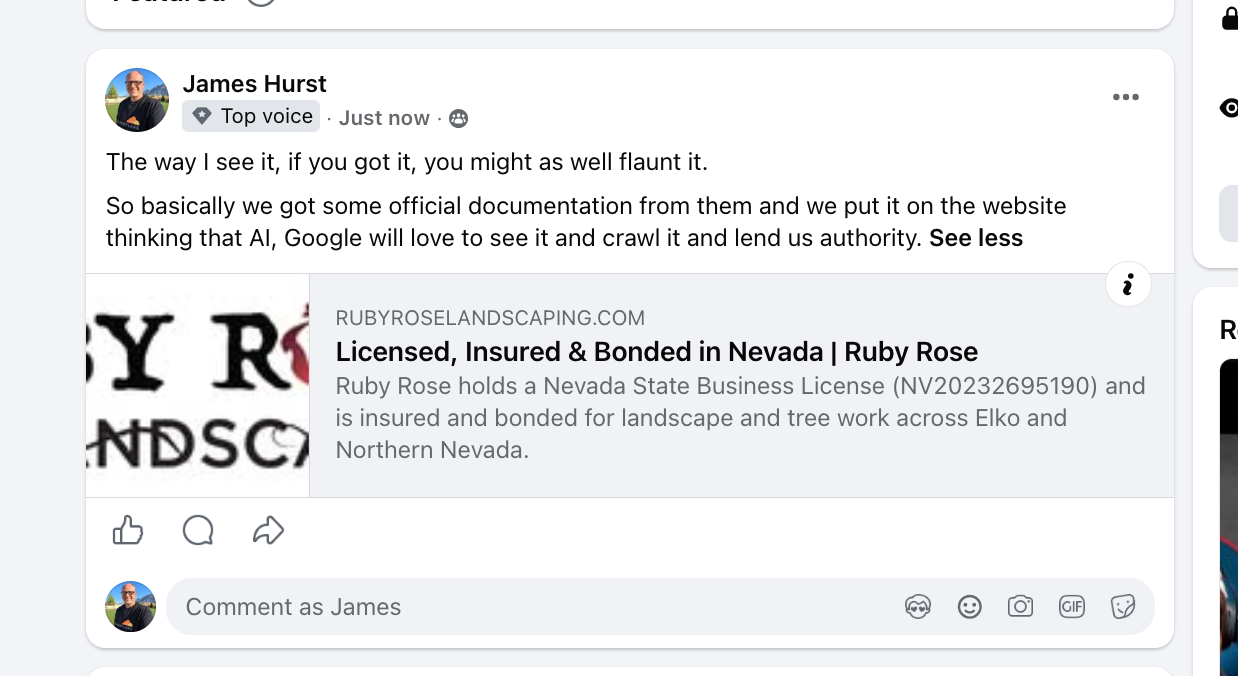
This morning I shared a client's new page on Facebook, a page I was proud of. The preview showed a thin sliver of their logo, cropped so tight you could barely read it.
The page had no share image tag. When a page does not tell Facebook which picture to use, Facebook grabs whatever image it finds and crops it to fit. That is what happened here.
The Fix Took One Change
Here is my vote for AI-coded websites. The site is built in code, and I work on it with Claude Code. The fix was one change to the shared page layout:
- a 1200 x 630 share card on every page;
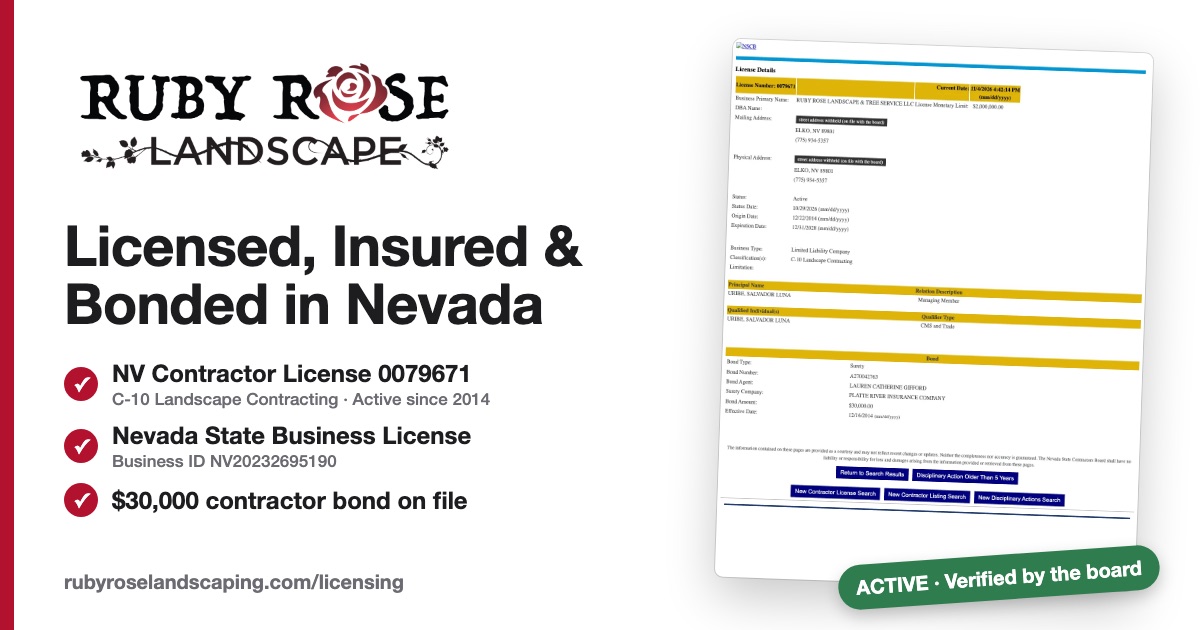
- a special card for the licensing page that shows the actual license record;
- a build check that fails if any page ever ships without a share card.
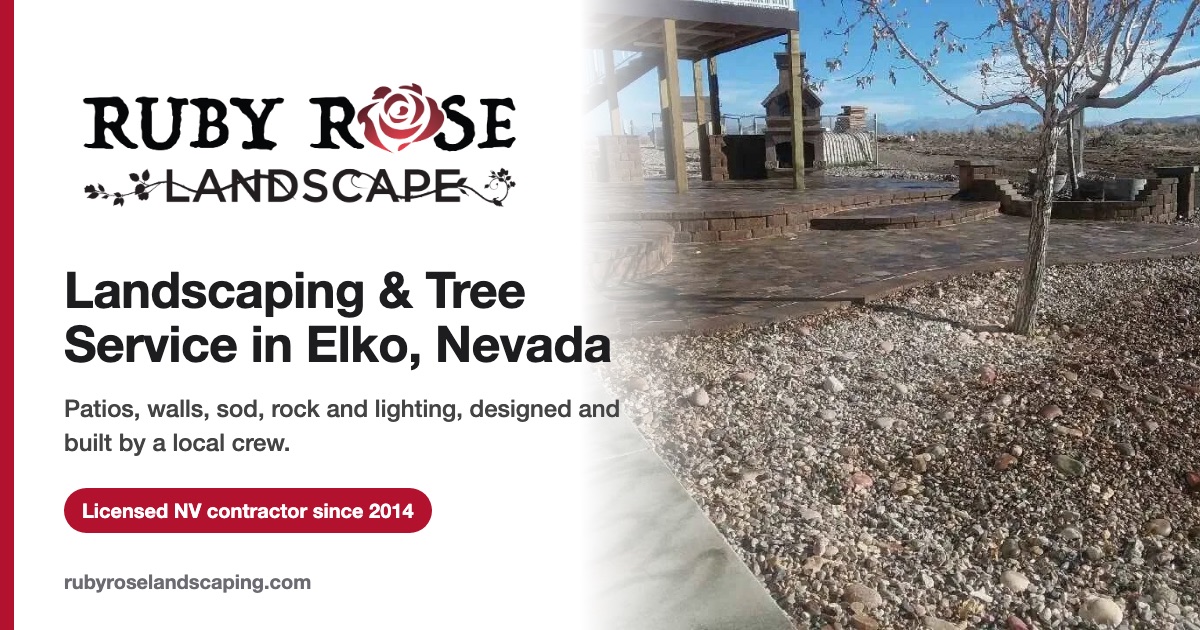
Here is the default card every page now shares: the logo, a plain headline, one trust line, and a real job photo.
The licensing page gets its own card, which shows the actual state license record:
That one change covered all 41 pages. The check means it stays fixed: if someone adds a page next year and forgets the image, the build stops before it goes live.
On a page-builder site, the same fix is a settings screen per page, or a plugin, plus the hope that nobody forgets. I have built plenty of sites both ways. The page builder is easier on day one. The coded site is easier on every day after that, because a fix happens once and a test guards it.
Make the Fix Stick: SOP Plus a Check
Fixing one site is nice. Fixing every site I will ever build is the real win. So the fix did not stop at this client.
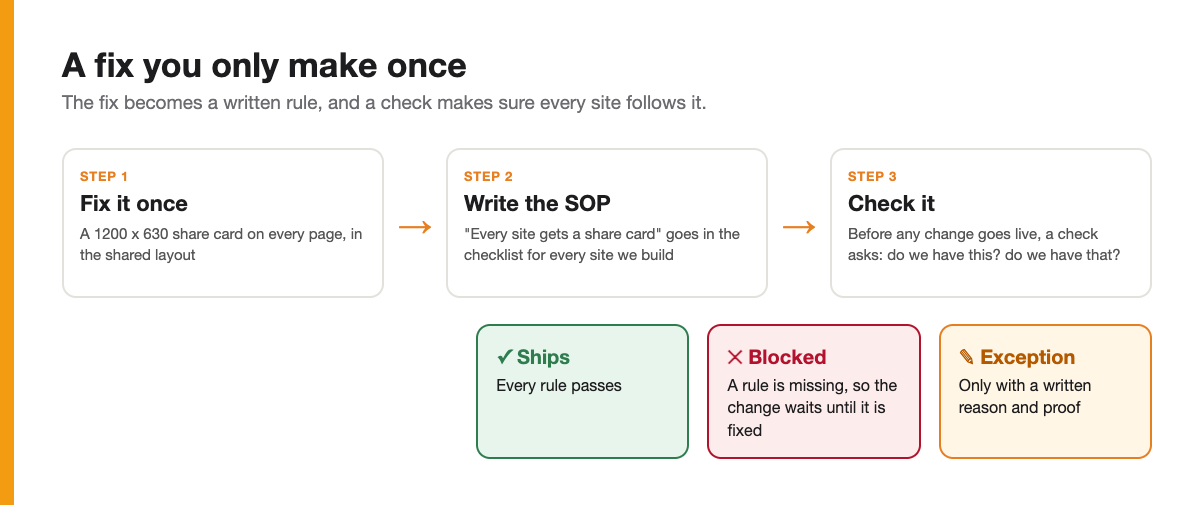
- Write it into the SOP. "Every page gets a 1200 x 630 share card" is now a line in the checklist for every website we build. It sits right next to robots.txt, the sitemap and structured data.
- Check it before anything goes live. Before a change ships, a check walks the checklist: do we have a share card? Do we have the build test? Do we have a canonical link? A missing item blocks the change until it is fixed.
- Exceptions need proof. Sometimes a rule does not fit a site. That is fine, but the exception gets written down with the reason and a link to the proof. "We will get to it" does not count.
A written SOP alone is a hope. Plenty of my old SOPs say all the right things and get skipped on a busy day. The check is what turns the SOP into a habit, and with AI doing the building, the check runs every single time without anyone remembering to run it.
Want to build sites this way? Start with Claude Code →
Our Toolbox. Every platform, plugin, and service we use and recommend, in one place. See the list →
The One Rule
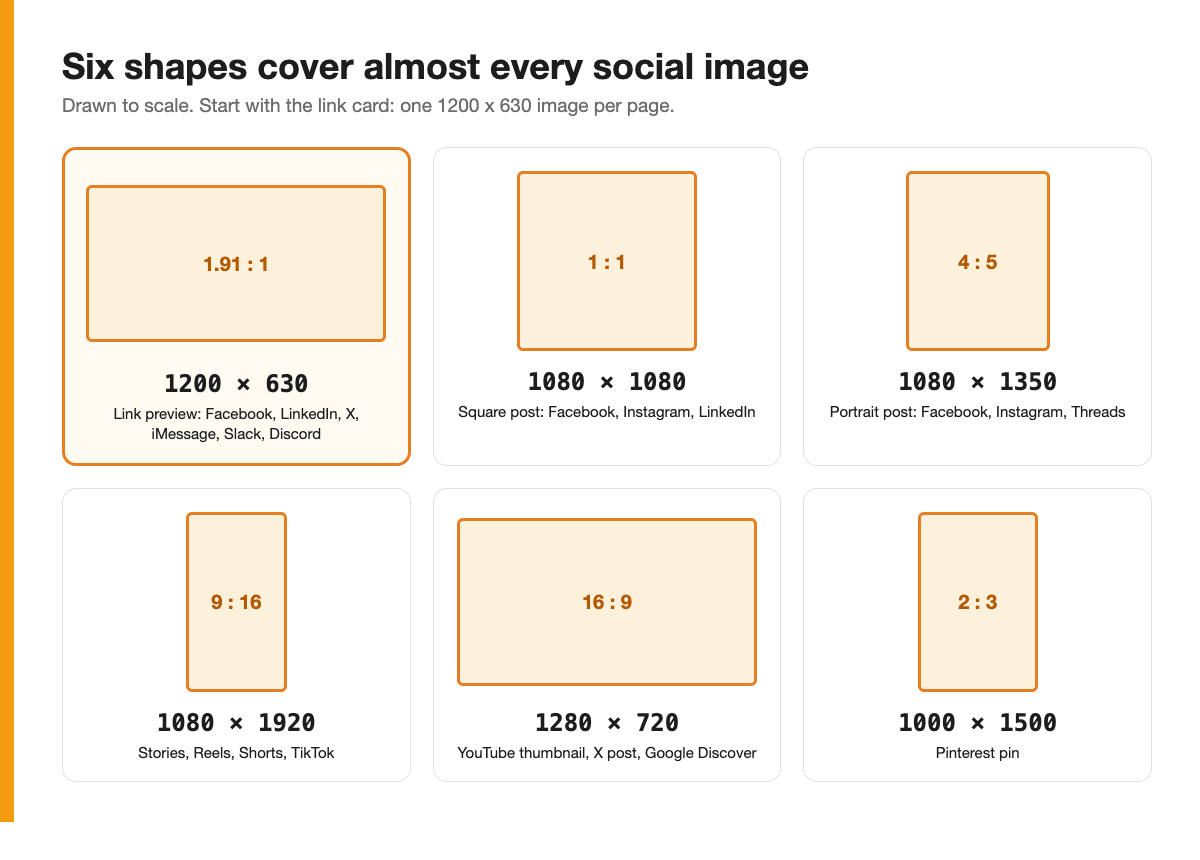
Every page gets one share image at 1200 x 630 pixels. Save it as a JPG under 300 KB, and keep your logo and headline in the middle square.
That single image covers Facebook, LinkedIn, X, iMessage, Slack, Discord, WhatsApp and Teams. The middle-square tip is for WhatsApp and some chat apps, which crop to the center.
Here is the same card as eight different apps show it, with the Messenger before and after at the top:
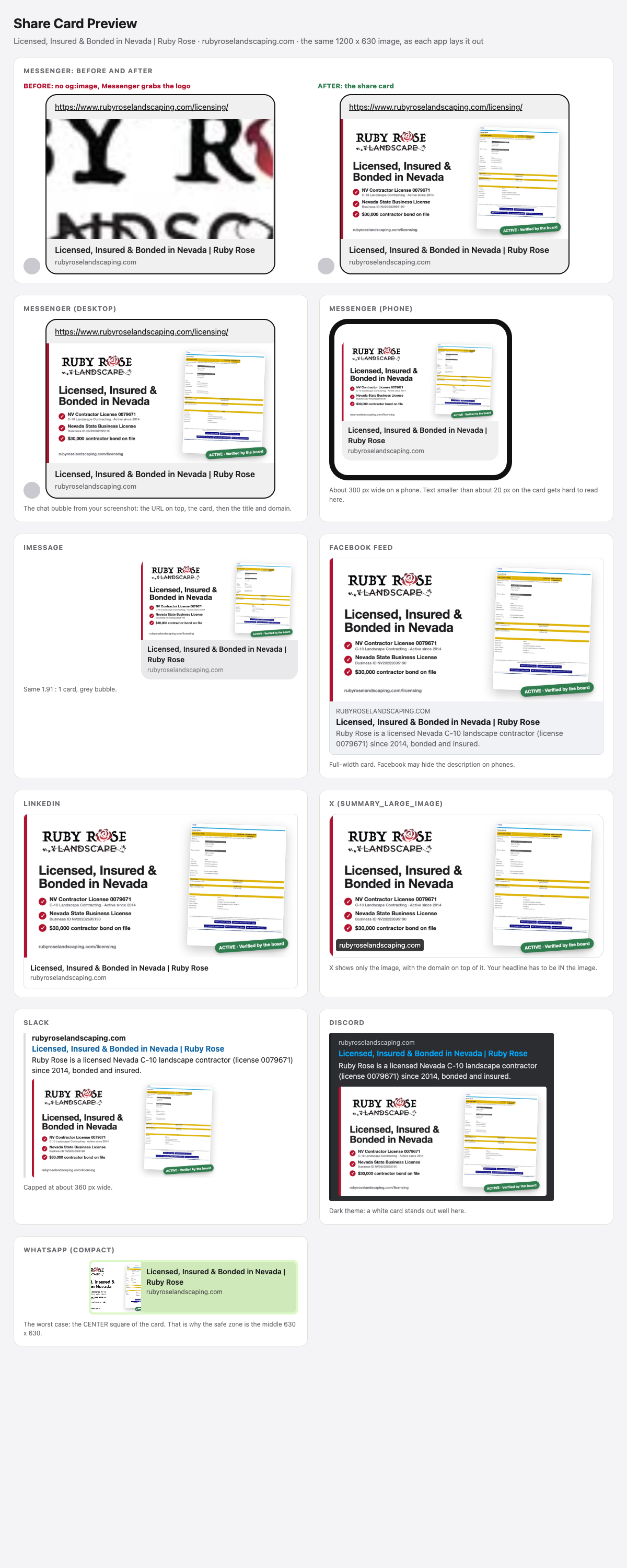
WhatsApp is the tricky one. It has no image tag of its own; it reads the same share image, and in its compact view it shows only the center square. That is why the logo and headline belong in the middle of the card.
Link Preview Sizes
These sizes apply when someone shares your URL.
| Where | Size | Shape | Notes |
|---|---|---|---|
| 1200 x 630 | 1.91 : 1 | Minimum 600 x 315. Anything smaller shows as a small square thumbnail | |
| 1200 x 627 | 1.91 : 1 | The Facebook image works fine | |
| X large card | 1200 x 628 | about 1.91 : 1 | Needs the twitter:card tag set to summary_large_image |
| X small card | 144 x 144 | 1 : 1 | What you get without the large-card tag |
| iMessage | 1200 x 630 | 1.91 : 1 | Reads the same share image |
| 1200 x 630 | crops to 1 : 1 | Keep it under 300 KB or it may not show | |
| Slack, Discord, Teams | 1200 x 630 | 1.91 : 1 | All read the same tags |
| 1000 x 1500 | 2 : 3 | Tall images do best there | |
| Google Discover | 1200 x 675 | 16 : 9 | At least 1200 wide, plus max-image-preview:large in the robots tag |
Post Sizes
These sizes apply to images you upload as a post.
| Where | Size | Shape |
|---|---|---|
| Facebook feed, square | 1080 x 1080 | 1 : 1 |
| Facebook feed, portrait | 1080 x 1350 | 4 : 5 |
| Stories and Reels (Facebook and Instagram) | 1080 x 1920 | 9 : 16 |
| Instagram portrait | 1080 x 1350 | 4 : 5 |
| Instagram square | 1080 x 1080 | 1 : 1 |
| LinkedIn post | 1200 x 627 | 1.91 : 1 |
| X post | 1600 x 900 | 16 : 9 |
| YouTube thumbnail | 1280 x 720 | 16 : 9 |
| Shorts and TikTok | 1080 x 1920 | 9 : 16 |
| Google Business Profile photo | 1200 x 900 | 4 : 3 |
| Pinterest pin | 1000 x 1500 | 2 : 3 |
| Threads | 1080 x 1350 | 4 : 5 |
On a portrait post, the Instagram profile grid now crops to 3 : 4 (1080 x 1440), so keep the important part in the middle. On Stories and Reels, keep text out of the top and bottom 250 pixels, where the app's buttons sit.
Profile and Cover Sizes
| Where | Slot | Size |
|---|---|---|
| Facebook Page | Profile picture | 320 x 320 |
| Facebook Page | Cover | 1640 x 624 (phones crop the sides) |
| Facebook Event | Cover | 1920 x 1005 |
| Facebook Group | Cover | 1640 x 856 |
| Profile picture | 320 x 320 | |
| Personal banner | 1584 x 396 | |
| Company cover | 1128 x 191 | |
| X | Header | 1500 x 500 |
| X | Profile picture | 400 x 400 |
| YouTube | Channel banner | 2560 x 1440 (keep the middle 1546 x 423 safe) |
| Google Business Profile | Logo | 720 x 720 |
| Google Business Profile | Cover | 1080 x 608 |
The Tags Every Page Needs
If you build in code, these go in the head of every page. Most site builders have a field for each of them.
| Tag | Value |
|---|---|
| og:image | Full https address of the 1200 x 630 image |
| og:image:width and og:image:height | 1200 and 630, so Facebook shows the big card on the first share |
| og:image:alt | One sentence describing the image |
| og:title | 60 characters or fewer |
| og:description | 155 characters or fewer |
| og:url | The page's main address |
| twitter:card | summary_large_image |
| apple-touch-icon | A 180 x 180 PNG |
After You Change the Image
Each platform keeps its own copy of your old preview. To refresh it:
- Facebook: paste the URL into the Sharing Debugger and click Scrape Again. Posts already shared keep the old card. If you deploy often, automate it: one request to Facebook's Graph API, a POST with your page URL and scrape=true, does the same thing. I run it after every deploy, and it prints back the title and image Facebook now has, so I know the new card took.
- LinkedIn: paste the URL into Post Inspector.
- X: the card refreshes on its own within about a week. Adding ?v=2 to the end of the URL forces a fresh card today.
- Slack, Discord and iMessage: these also cache by URL, so test with the same ?v=2 trick.
Platforms change these sizes from time to time, so I check them once a year. The 1200 x 630 rule has held for a long time.
Need help setting this up on your site? Create a ticket today →
See Also
We are an independent affiliate of The Checklist Manifesto and may earn a commission if you sign up through links on this page. We are not employees or representatives of The Checklist Manifesto.
We are an independent affiliate of Claude Code and may earn a commission if you sign up through links on this page. We are not employees or representatives of Claude Code.
Some links in this article are affiliate links. If you purchase through them, we may earn a commission at no extra cost to you. This helps support our content.
This article blends original content, AI-assisted drafting, and human oversight. How I write.
Stay Updated
Get notified when new content is published.
No spam. Unsubscribe anytime.