I Built a Deep SEO Audit with Claude Code
What came back was not a simple answer. It was a full diagnostic session that uncovered a GSC reporting bug, found 5 real SEO problems I didn't know I had, built a reusable audit script, and fixed everything in one sitting. Here's what happened.
The Scary Number: 0 out of 303
Google Search Console was showing 0 out of 303 pages indexed from my sitemap. That's a terrifying number for a site with 303 pieces of content. Zero percent index rate. The kind of number that makes you think something is fundamentally broken.
The First Discovery: The Dashboard Was Behind
Claude Code's first move was smart. Instead of trusting the sitemap coverage report (which said 0/303 indexed), it ran individual URL inspections on specific pages through the GSC API.
Every single page came back "Submitted and indexed." Verdict: PASS.
The 0/303 number in the sitemap coverage dashboard is a known reporting lag with Next.js dynamic sitemaps. The coverage report just hadn't caught up with reality yet. The pages were indexed the whole time.
This is the kind of thing that would have sent me down a rabbit hole for hours. Claude Code figured it out in about 30 seconds by cross-referencing two different data sources from the same API.
The 5 Real Problems
With the false alarm cleared, Claude Code kept digging. The site was getting 1,202 impressions but only 10 clicks across all 303 pages. Something was still wrong. Here's what it found:
1. No Lastmod Dates in the Sitemap
My sitemap had 303 URLs but zero lastmod fields. Google uses lastmod to decide which pages to recrawl and when. Without it, Google has to guess, and it tends to deprioritize pages it thinks are stale.
The fix: Claude Code read the content library, pulled the publish and modified dates from the markdown frontmatter, and added lastmod to every entry. 300 out of 303 URLs now have dates.
2. Old WordPress URLs Returning 404
The site migrated from WordPress to Next.js a while back. Most of the old URLs had redirects, but some slipped through. Old category pages like /category/general-info and date archives like /2025/10 were returning 404 errors. Google still had these in its index, so every time Googlebot visited one, it wasted crawl budget and got a negative signal.
The fix: 9 redirect rules in the Next.js config. Category pages redirect to their new equivalents. Date archives and the old RSS feed URL redirect to the homepage. Author pages redirect to the about page.
3. Homepage Title Had No Keywords
The homepage title was just "The Marketing Show." No keywords, no description of what the site actually covers. Google didn't know what to rank it for.
The fix: Changed the title to include actual keywords people search for, and rewrote the meta description to describe what the site covers and who wrote it.
4. Page Titles Getting Truncated in Search Results
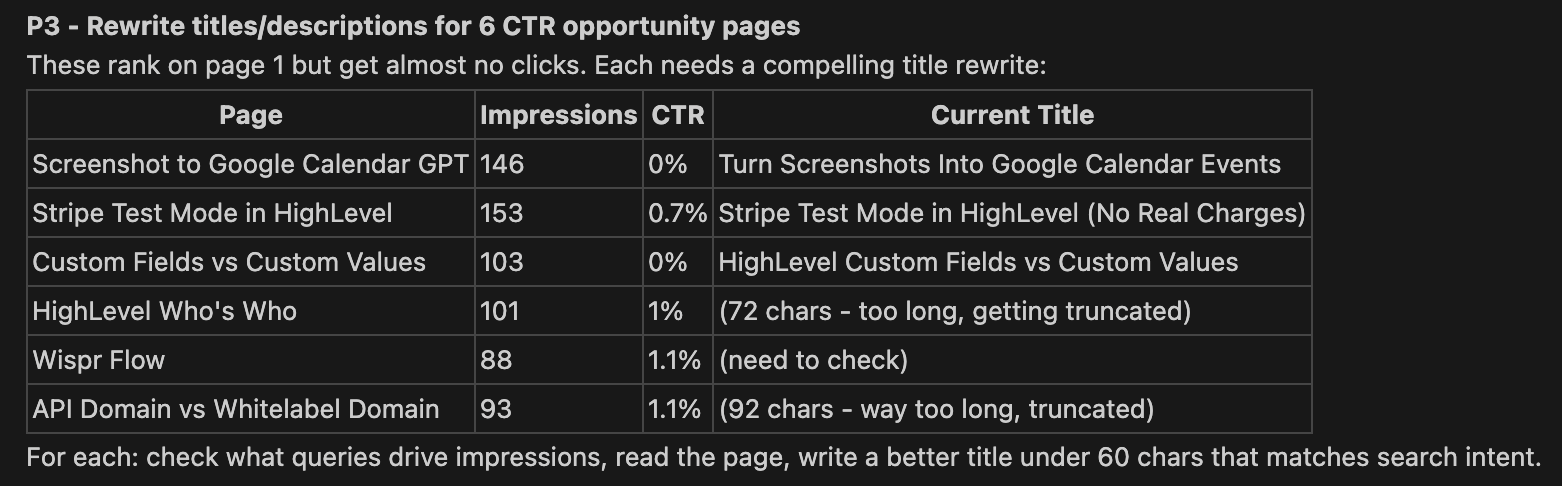
Two pages had titles over 70 characters. Google truncates titles around 60 characters in search results, so searchers were seeing cut-off titles that didn't make sense. Six pages total had CTR under 2% despite ranking on page 1. Google was showing them, but nobody was clicking.
The fix: Rewrote all 6 titles to be under 60 characters and match the actual queries driving impressions. For example, a 92-character title about API domains got trimmed to 46 characters that matched what people were actually searching for.
Our Toolbox. Every platform, plugin, and service we use and recommend, in one place. See the list →
5. Category Page Too Heavy for Crawling
The HighLevel category page was 209KB of HTML. It rendered all 71 articles as full cards with thumbnails, excerpts, and metadata. Google recommends pages under 150KB for efficient crawling.
The fix: Added pagination for any category with more than 30 articles. The HighLevel page went from 209KB down to 76KB. Added lazy loading on all thumbnail images across every category page.
The Deep Audit Script
The most useful thing to come out of this session wasn't any single fix. It was the realization that none of this shows up in a standard GSC health report.
The standard dashboard tells you clicks, impressions, and sitemap status. It doesn't tell you that your sitemap is missing lastmod dates. It doesn't tell you that old WordPress URLs are 404ing. It doesn't cross-reference individual URL inspections against the sitemap coverage report to catch reporting discrepancies.
So Claude Code built a reusable audit script that checks everything we checked manually:
- Sitemap quality - lastmod presence, freshness, content-type header
- Batch URL inspection - inspects a sample of URLs via the GSC API to catch discrepancies between the coverage report and reality
- Meta tag audit - title length, description, canonical tags, noindex directives, structured data
- Homepage SEO - keyword density in the title, description quality
- Old URL detection - checks common WordPress URL patterns for 404s, separating real content problems from expected infrastructure 404s
- Page weight - HTML size for crawl budget analysis
- robots.txt validation - full parse including sitemap directive check
One command: python3 gsc-deep-audit.py --site yourdomain.com
It runs all 7 checks and prints a summary of every issue it finds. The whole thing takes about 30 seconds.
The Pattern
This follows the same pattern I keep seeing with Claude Code: you start with a question, the AI investigates, and by the end of the session you have both the answer and a tool that can answer the question again in the future.
The investigation was the valuable part. The fixes were straightforward once we knew what was wrong. But finding what's wrong is the hard part of SEO, and that's where having an AI that can call APIs, read source code, and cross-reference data sources in real time makes a difference.
Want to try this yourself? Get started with Claude Code - it connects to any API you give it access to.
Results
Everything shipped in one session:
| Fix | Impact |
|---|---|
| Sitemap lastmod dates | 300 URLs now tell Google when they were last updated |
| WordPress 404 redirects | 7 content URLs no longer waste crawl budget |
| Homepage title rewrite | Keywords where there were none |
| 6 page title rewrites | Titles under 60 chars matching actual search queries |
| Category pagination | 209KB page reduced to 76KB (63% smaller) |
| Deep audit script | Reusable tool for ongoing monitoring |
The real test comes over the next few weeks as Google recrawls with the new data. I'll run the deep audit again in 30 days and compare.
Need help with SEO on your site? Create a ticket today - our specialists handle technical SEO audits, site migrations, and Google Search Console issues.
See Also
- Claude Code Fixed My SEO in Minutes - The earlier article about connecting Claude Code to GSC for quick fixes
- 16 Domains Added to Search Console in 2 Minutes - Bulk domain setup with Claude Code
- Google Search Console - Overview of the platform and what it tracks
- The Deterministic Pattern - Why scripts handle the data and Claude handles the judgment
See Also
We are an independent affiliate of Claude Code and may earn a commission if you sign up through links on this page. We are not employees or representatives of Claude Code.
We are an independent affiliate of HighLevel and may earn a commission if you sign up through links on this page. We are not employees or representatives of HighLevel.
Some links in this article are affiliate links. If you purchase through them, we may earn a commission at no extra cost to you. This helps support our content.
This article blends original content, AI-assisted drafting, and human oversight. How I write.
Stay Updated
Get notified when new content is published.
No spam. Unsubscribe anytime.